Tailscale Remote


Project Overview
Cross-platform Pure Rust Tailscale phone-to-PC wireless trackpad, keyboard, and media remote with instant QR pairing
Architecture & Engineering Notes
📱 Tailscale Remote — Phone Trackpad, Keyboard & Media KVM (Pure Rust)
A low-latency, cross-platform wireless phone-to-PC input bridge built in 100% pure Rust (Axum, Tokio, and evdev/Win32/CoreGraphics) that displays an instant pairing QR code over your Tailscale mesh VPN so your phone becomes a simple, couch-friendly trackpad, open-app switcher, YouTube launcher, and live keyboard whenever your mouse and keyboard are out of reach.







✨ Showcase Preview
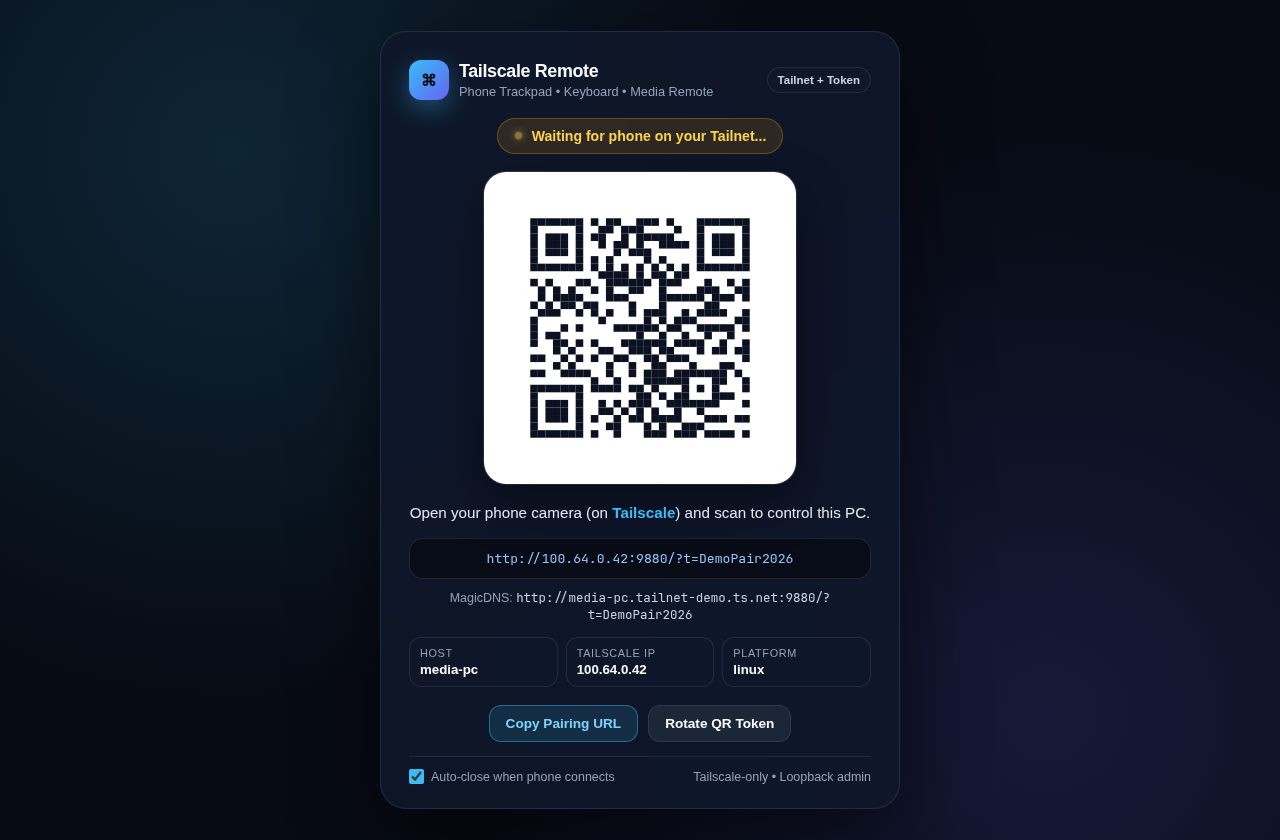
Instant Launch QR Pairing Screen (http://127.0.0.1:9880/qr) featuring live Tailscale IP/MagicDNS discovery, token rotation, and automatic countdown dismissal upon phone connection.
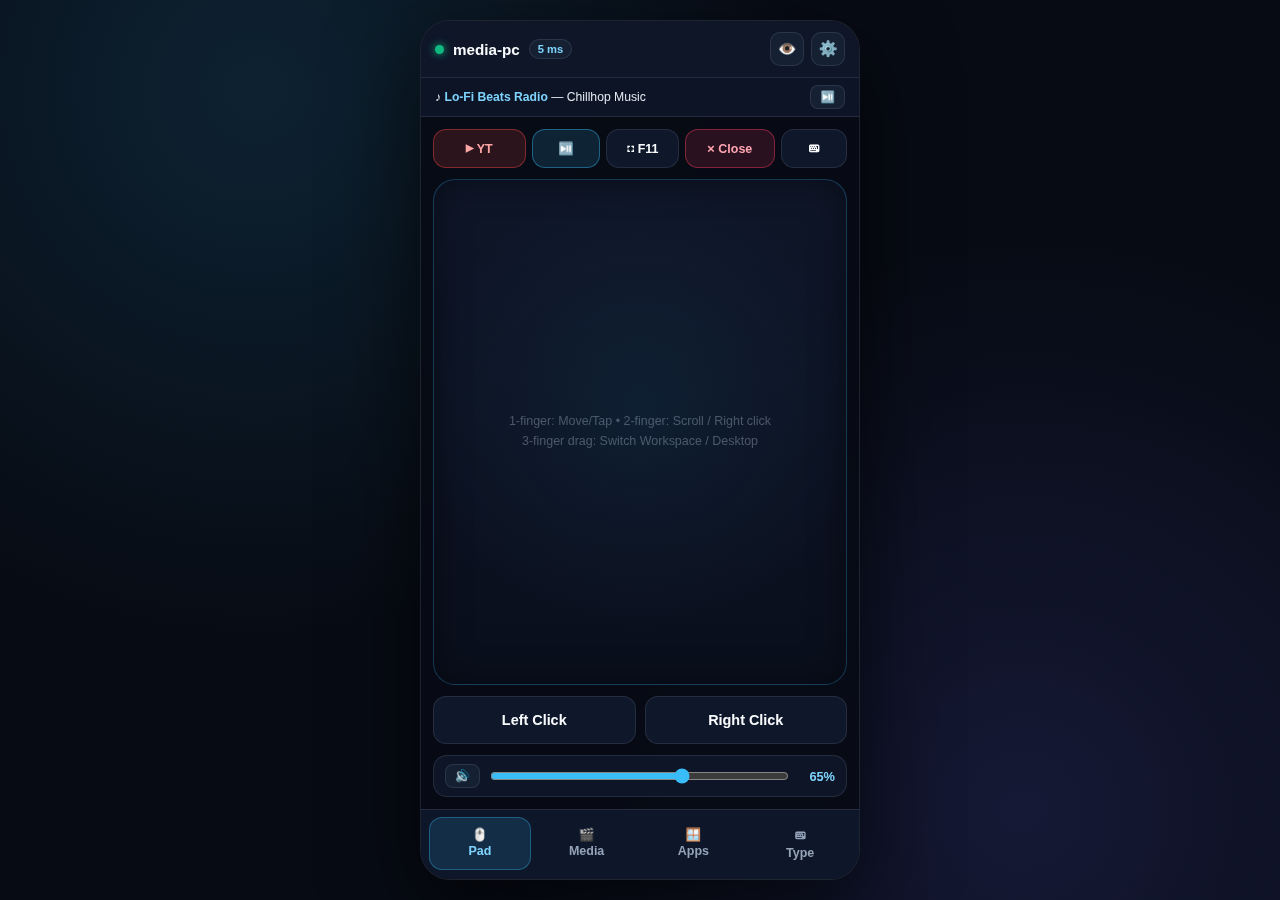
Pad Tab: Uncluttered multi-touch trackpad with ▶ YT, ⏯, ⛶ F11, one-tap ✕ Close (closes window under mouse), keyboard shortcut, live volume slider, and Screen Peek (👁).
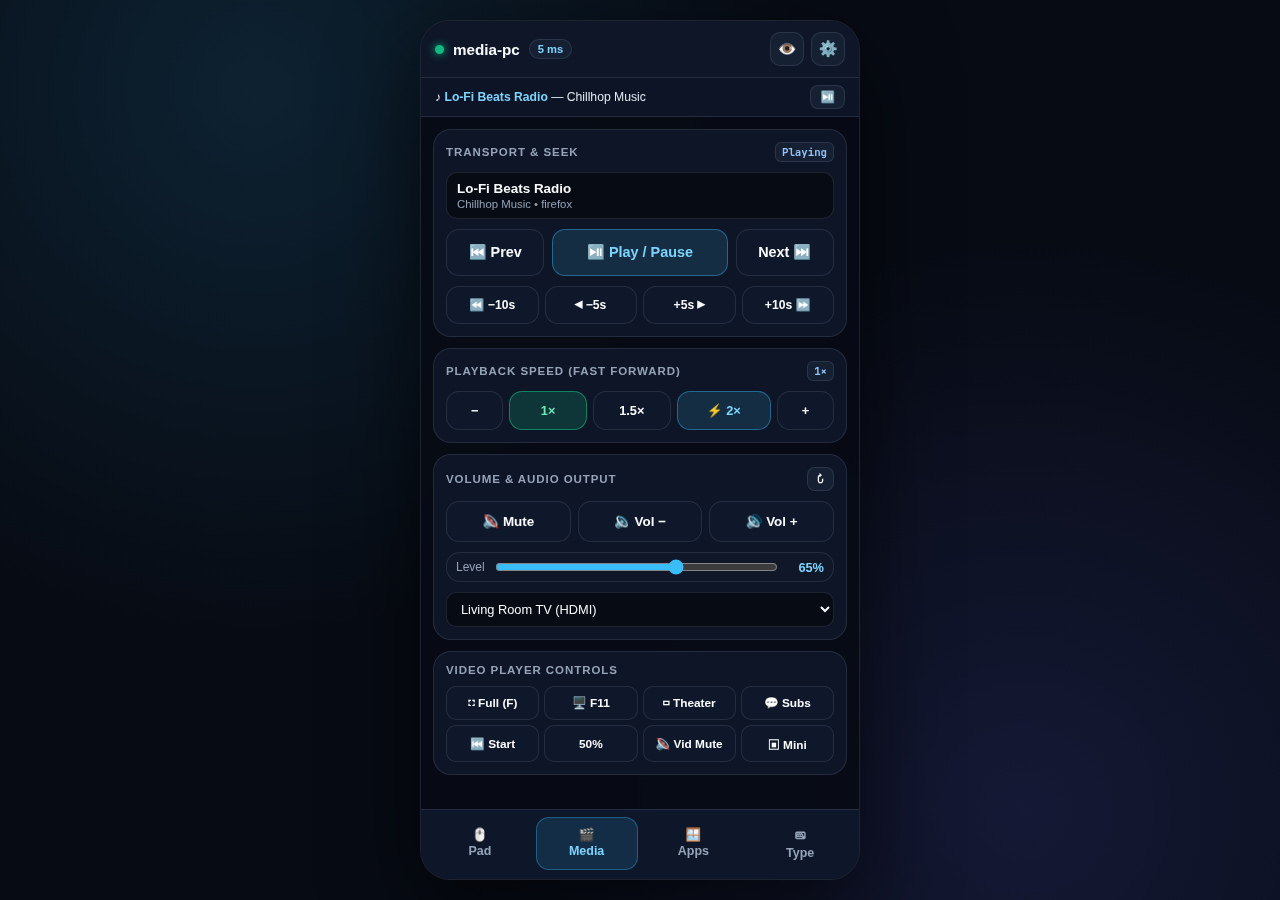
Media Tab: Dedicated couch media remote featuring hero transport (Prev, Play/Pause, Next), ±5s/±10s seeking, 1×/1.5×/2× playback speed toggles, Mute & Volume controls, HDMI/Speaker output switcher, and Video Player controls.
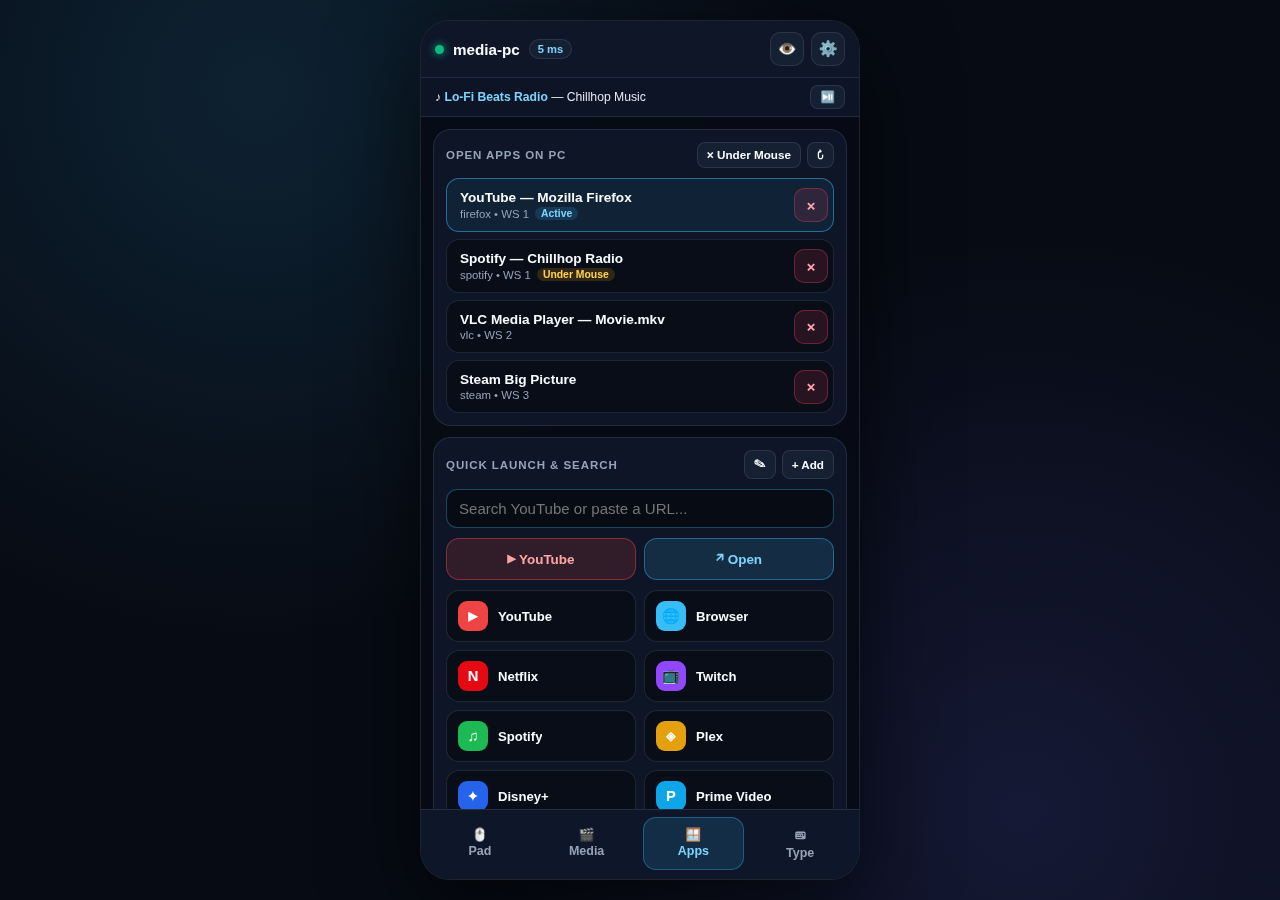
Apps Tab: Live Open Apps switcher (Active & Under Mouse badges, tap to focus or ✕ to close), direct YouTube search & URL opener, customizable Quick-Launch deck, and TV D-Pad.
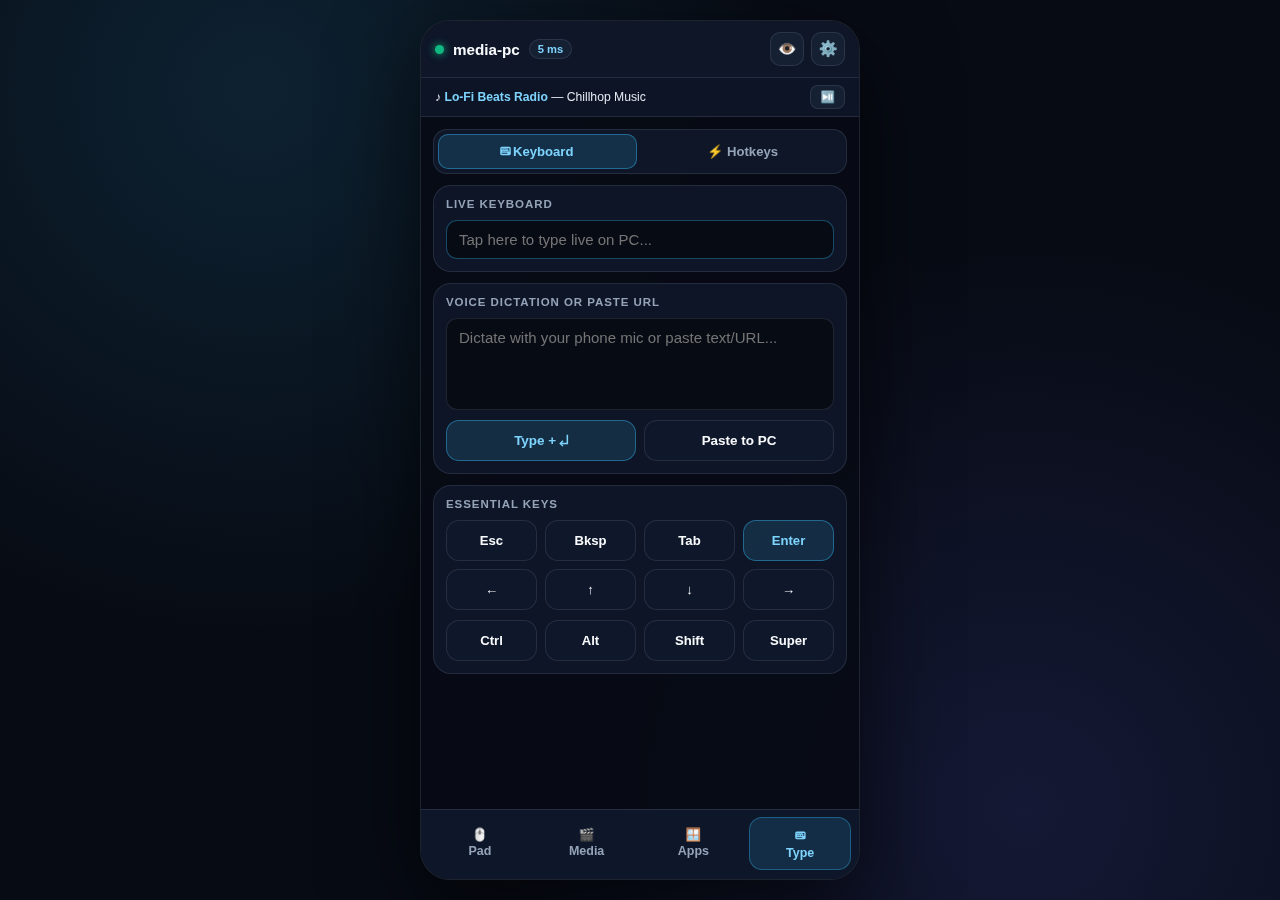
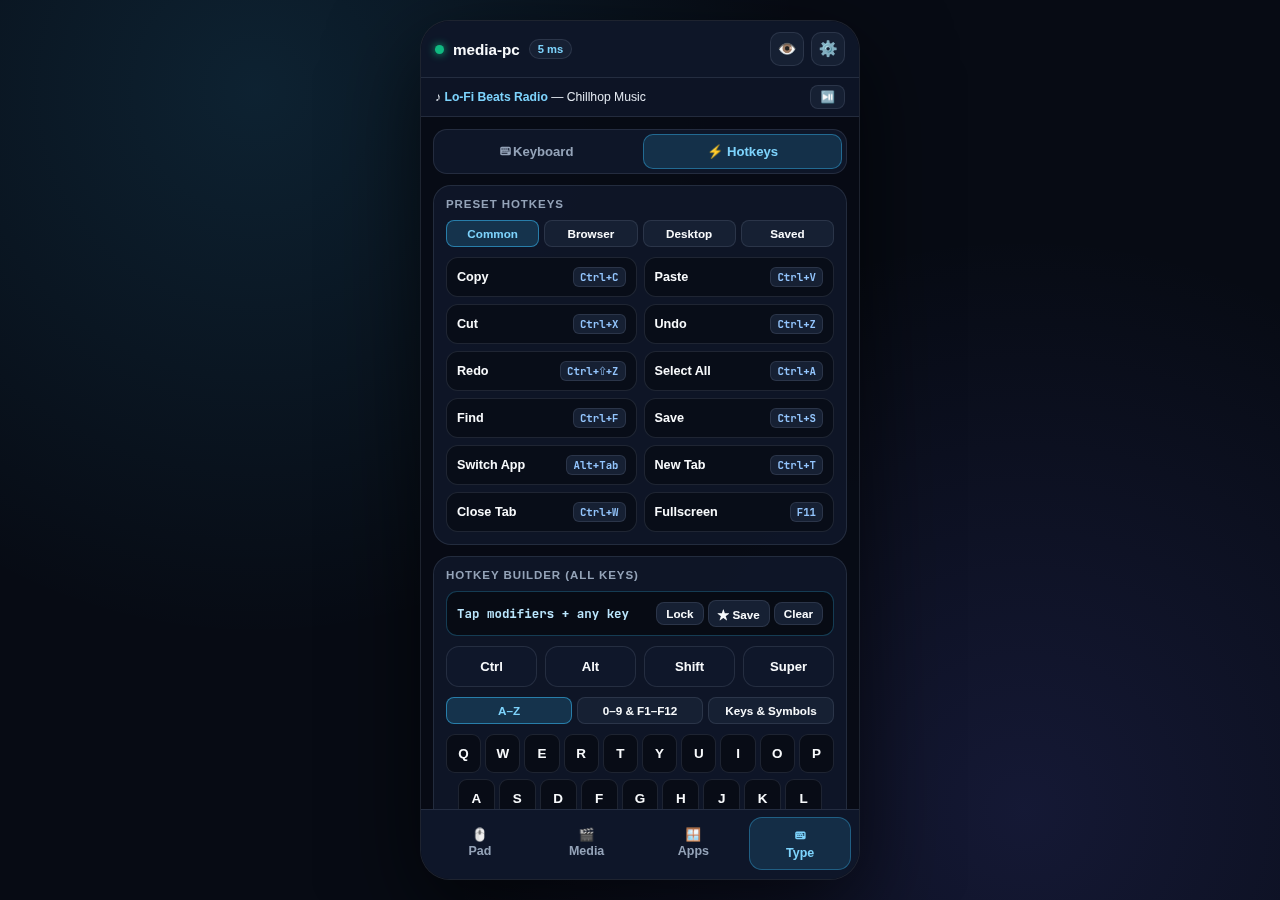
Type Tab: Real-time mobile keyboard streaming, voice dictation / clipboard paste to PC, essential navigation keys, and sticky modifier toggles.
Hotkeys Studio: 1-tap Common, Browser, Desktop & Saved hotkey presets plus a visual Hotkey Builder with Ctrl/Alt/Shift/Super toggles and full A–Z, 0–9, F1–F12, navigation, and symbol key banks.
🌟 Key Features
- Instant Dual-Mode QR Pairing on Launch: Generates an SVG QR pairing screen (
http://127.0.0.1:9880/qrauto-opened in a frameless app window) alongside a high-contrast Unicode half-block terminal QR code, dynamically binding to your host's Tailscale IPv4 (100.x.y.z) or MagicDNS name viatailscale status --json. - Zero-Trust Tailscale-Only Enforcement & Cryptographic Tokens: Binds strictly to
127.0.0.1and the host's Tailscale interface, enforces Tailscale CGNAT (100.64.0.0/10) and ULA (fd7a:115c:a1e0::/48) client IP verification, validatesHostandOriginheaders to defeat DNS rebinding and Cross-Site WebSocket Hijacking (CSWSH), protects/qr,/ws/host, and/api/token/rotatewith loopback + CSRF header guards (403otherwise), immediately revokes active/ws/remotesessions on token rotation, applies per-IP failed-auth rate limiting, enforces strictContent-Security-Policy/X-Frame-Options: DENY/Referrer-Policy: no-referrer/Cache-Control: no-storeheaders, and authenticates phones using a 12-character Base62 CSPRNG token (getrandom, orTSR_TOKENenv var) persisted in anHttpOnly; SameSite=Laxcookie. - Open Apps Switcher & Close-Under-Mouse Control: Queries live desktop windows across Hyprland 0.56+ Lua IPC (
hl.dsp.focus/hl.dsp.window.close/hl.dsp.dpms), X11 (wmctrl), Windows (Win32 HWND), and macOS (osascript) so you can switch to any open app, close individual windows, or tap✕ Closeright above the trackpad to close whichever window the cursor is hovering over. - 1-Tap Hotkey Presets & Visual Key Builder: Dedicated
⚡ Hotkeysstudio offering Common / Browser / Desktop / Saved hotkey preset grids (Ctrl+C/V/Z,Alt+Tab,Ctrl+Shift+T,Super+Space, etc.) alongside a full visual QWERTY (A–Z),0–9 & F1–F12, and Keys/Symbols builder with modifier lock and custom preset saving. - Quick-Launch Deck, YouTube Search & Couch Controls: One-tap YouTube, Browser, Netflix, Twitch, Spotify, Plex, Disney+, Prime Video, and Steam Big Picture tiles with persistent custom shortcuts (
shortcuts.json), direct YouTube Search / URL Opener, and a TV D-Pad + Zoom (Ctrl ±) pad. - Synced Audio, Now Playing, Screen Peek, Sleep Timer & Power: Reads and controls real system volume (
0–100%) and Audio Outputs (PipeWire/PulseAudiopactl/wpctl, AppleScript/SwitchAudioSource), surfaces Now Playing metadata (MPRISplayerctl/busctl), captures live Screen Peek JPEGs (grim/ffmpeg), schedules Sleep Timers, and exposes confirmed Power & Tailnet Multi-PC Switcher actions inside the⚙drawer. - Cross-Platform Kernel & OS Virtual HID Injection: Drives native pointer, scroll, keyboard, and media events across Linux Wayland/Hyprland & X11 (
/dev/uinputviaevdev), Windows (SendInputwith UTF-16KEYEVENTF_UNICODE), and macOS (CoreGraphicsCGEventFFI) on a dedicated bounded worker thread with automaticReleaseAllsafety cleanup on disconnect.
🏗 Architecture & Tech Stack
+-----------------------------------+        Encrypted Tailscale WireGuard Tunnel
|     PHONE BROWSER (iOS/Android)   |        http://100.x.y.z:9880/?t=<12-char>
|  • Pad   : Trackpad + F11 + Close | <==========================================+
|  • Media : 2× Speed + Seek + Vol  |        WebSocket (/ws/remote) + REST API   |
|  • Apps  : Open Windows + Launch  |                                            |
|  • Type  : Keyboard + Hotkeys     |                                            |
+-----------------------------------+                                            v
                                                          +-----------------------------------+
+-----------------------------------+  Loopback WS        |    TAILSCALE REMOTE HOST (Rust)   |
|     TV / MONITOR QR WINDOW        |  (/ws/host)         |  • Axum 0.8 + Tokio Async Server  |
|  • http://127.0.0.1:9880/qr       | <-----------------> |  • Tailnet IP & Token Middleware  |
|  • Auto-closes 3s after pairing   |                     |  • Bounded HID Channel (512)      |
+-----------------------------------+                     +-----------------------------------+
                                                                     |              |
                                           +-------------------------+              +-------------------------+
                                           v                                                                  v
                       +---------------------------------------+                          +-----------------------------------+
                       |      NATIVE VIRTUAL HID WORKER        |                          |     SYSTEM & WINDOW INTEGRATIONS  |
                       |  Linux  : /dev/uinput (evdev)         |                          |  • Hyprland 0.56 Lua / Win32 / Mac|
                       |  Windows: Win32 SendInput + clip.exe  |                          |  • pactl Audio & busctl MPRIS     |
                       |  macOS  : CoreGraphics CGEvent        |                          |  • grim / ffmpeg Screen Peek      |
                       +---------------------------------------+                          +-----------------------------------+
Repository Layout
tailscale-remote/
├── src/
│   ├── main.rs        # CLI flags, Tailscale detection, dual-bind server & QR browser launcher
│   ├── server.rs      # Axum HTTP/WebSocket router, Tailscale/loopback guards & REST APIs
│   ├── system.rs      # Window switcher/close-under-cursor, shortcuts, audio, MPRIS, Screen Peek & Power
│   ├── input.rs       # Dedicated virtual HID worker (Linux uinput, Win32 SendInput, macOS CGEvent)
│   ├── keymap.rs      # Web KeyboardEvent.code, ASCII QWERTY, Media, Win32 VK & macOS keycode tables
│   ├── protocol.rs    # Typed JSON WebSocket wire messages (ClientMsg, ServerMsg, HostEvent)
│   ├── qr.rs          # CSPRNG Base62 token generator, SVG QR & Unicode half-block terminal QR
│   └── tailscale.rs   # `tailscale status --json` parser, peer label lookup & CGNAT/ULA IP guards
├── static/
│   ├── qr.html        # Zero-dependency dark-mode TV/Desktop QR pairing screen
│   └── remote.html    # Self-contained 4-tab mobile Pad / Media / Apps / Type PWA UI + ⚙ drawer
├── demoPics/          # Showcase screenshots for portfolio synchronization
├── build.sh / build.ps1
└── run-remote.sh / run-remote.ps1
🚀 Setup & Installation
1. Prerequisites
- Tailscale installed and logged in on both your media PC and your phone (
tailscale up). - Rust toolchain (
rustc+cargo, 2021 edition). - (Linux optional utilities)
wl-clipboard/xclip(clipboard paste),grim(Wayland Screen Peek),pulseaudio-utils/wireplumber(audio switcher).
2. Build the Binary
git clone https://github.com/ryguy0601/tailscale-remote.git
cd tailscale-remote

# Linux / macOS
./build.sh
# Windows (PowerShell)
.\build.ps1
3. Linux /dev/uinput Permissions (One-Time Setup for Wayland / X11)
To allow tailscale-remote to emit virtual mouse and keyboard events without sudo:
echo uinput | sudo tee /etc/modules-load.d/uinput.conf
echo 'KERNEL=="uinput", MODE="0660", GROUP="input", OPTIONS+="static_node=uinput"' | sudo tee /etc/udev/rules.d/99-uinput.rules
sudo usermod -aG input "$USER"
sudo modprobe uinput && sudo udevadm control --reload-rules && sudo udevadm trigger
# Log out and back in (or run `newgrp input`) so group membership applies
4. Launch & Scan
# Linux / macOS — opens the QR pairing screen & prints a terminal QR
./run-remote.sh

# Auto-start on login (headless terminal/background mode)
./run-remote.sh --install-startup
# Windows (PowerShell)
.\run-remote.ps1

# Auto-start on Windows logon
.\run-remote.ps1 -InstallStartup
🎮 Touch Gestures & CLI Options
Trackpad Gestures
| Gesture | PC Action |
|---|---|
| 1-Finger Drag | Smooth accelerated pointer movement |
| 1-Finger Tap | Left click |
| Double-Tap & Hold | Left-button click-and-drag |
| 2-Finger Drag | Vertical & horizontal smooth scrolling |
| 2-Finger Tap | Right click |
| 3-Finger Horizontal Drag | Switch to next / previous workspace / desktop |
| 3-Finger Tap | Middle click |
CLI Flags
| Flag | Description |
|---|---|
-p, --port <PORT> |
TCP port to listen on (default: 9880) |
--token <TOKEN> |
Use a custom pairing token instead of an ephemeral 12-char token (or set TSR_TOKEN env var) |
--no-auth |
Disable pairing token requirement (remains Tailscale-only) |
--use-magicdns |
Embed MagicDNS hostname instead of Tailscale IPv4 in the QR URL |
--no-browser / --cli |
Print terminal QR only without opening the desktop browser popup |
--dry-run |
Log input, launch, window, and power events without emitting OS changes |
--allow-lan |
Allow non-Tailscale LAN IPs (for local testing without a tailnet) |
--bind <IP[:PORT]> |
Override or specify a custom bind address |
📄 License
Distributed under the MIT License.