Tailscale Kvm


Project Overview
Zero-overhead Pure Rust 4-way software KVM over Tailscale (Windows, Wayland/Hyprland, macOS) with drag-and-drop Web UI & synced dual-PC demo recorder.
Architecture & Engineering Notes
⚡ Tailscale Software KVM — Universal Multi-Directional Mesh (Pure Rust)
A low-latency, zero-overhead software KVM switch built in 100% pure Rust (host, receiver, and shared capture modules) that turns Windows, Linux (Wayland/Hyprland & X11), and macOS machines on a Tailscale mesh VPN into a single seamless multi-monitor workspace—complete with drag-and-drop 2D topology routing, kernel-level /dev/uinput injection, clipboard/file handoff, and a synchronized dual-computer demo recorder.







✨ Showcase Preview
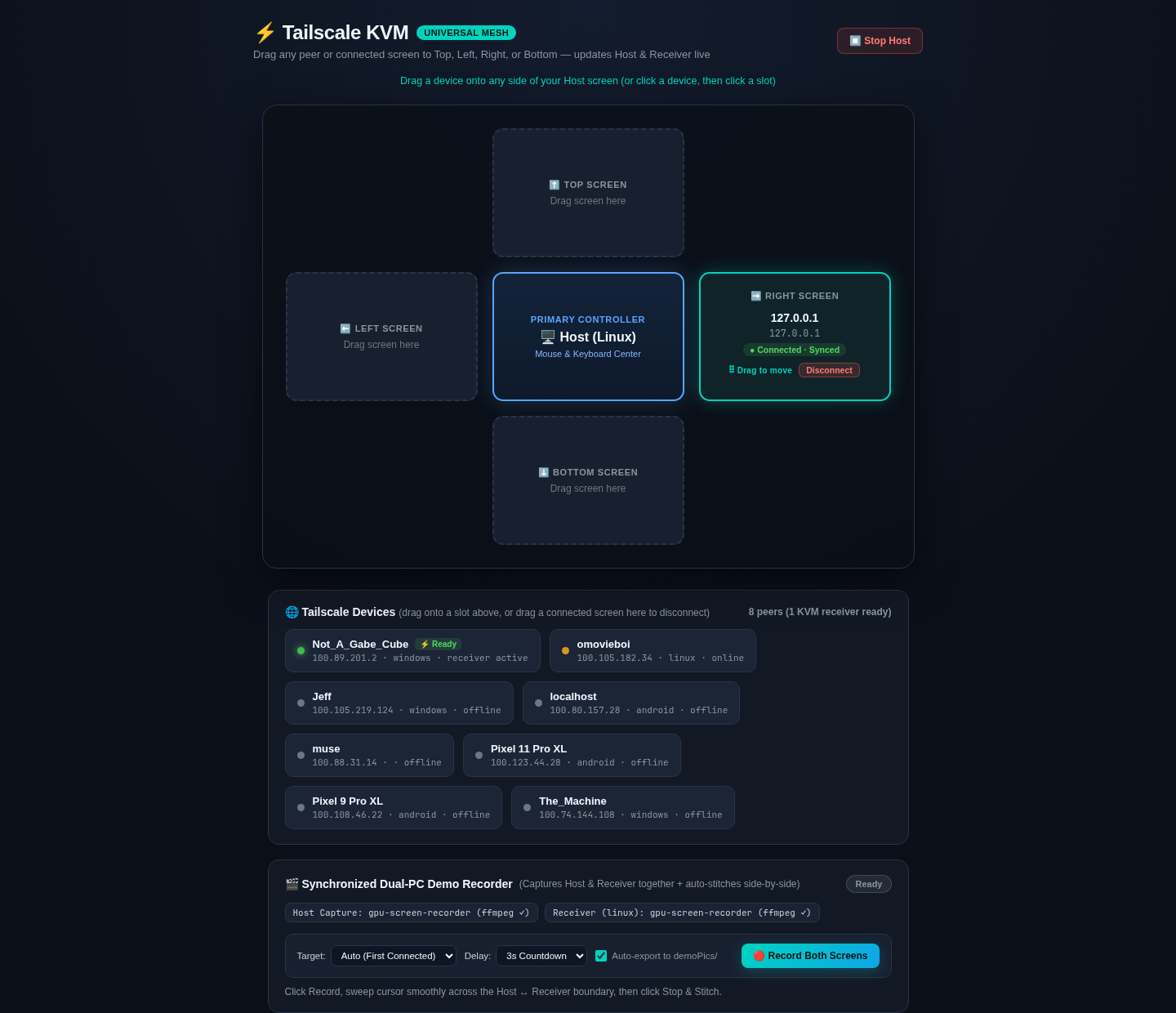
Interactive 2D Topology Dashboard (http://localhost:9877) featuring live Tailscale peer probing, drag-and-drop 4-way slot routing, and the synchronized Dual-PC Demo Recorder.
Live interaction workflow: assigning & repositioning Tailscale receivers across Top, Left, Right, and Bottom slots with instant reciprocal return-edge synchronization and dual-PC recording controls.
🌟 Key Features
- Universal 4-Way Multi-Directional Mesh: Engineered a pool of 4 independent TCP slot workers (
Right,Left,Up,Down) over Tailscale (100.x.y.z:9876) with monotonic session IDs and reciprocal return-edge negotiation (E <edge>), letting control flow cleanly in any physical monitor arrangement. - Wayland & Hyprland Kernel Input Injection: Built a pure-Rust virtual HID pipeline backed by
/dev/uinputandevdevon Linux (plusSendInputon Windows andCGEventon macOS), bypassing compositor synthetic-input blocks with sub-millisecond cursor & scancode forwarding. - Zero-Ghost-Click Event Suppression: Implemented low-level
WH_MOUSE_LLandWH_KEYBOARD_LLhooks on Windows,EVIOCGRABon Linux, andCGEventTapon macOS to swallow local host events while controlling a remote node—eliminating duplicate clicks and leaked keystrokes. - Zero-Config Tailscale Discovery & Low-Idle Resource Usage: Queries
tailscale status --jsonwith concurrent:9876port probes (220mstimeout), throttles background polling (3swhile UI is active,20sidle), and parks sleeping TCP/clipboard loops with ~4.6 MB resident RAM and negligible CPU load. - Cross-OS Clipboard, Image & Browser/Explorer Handoff: Synchronizes Unicode text (
T), raw bitmap/PNG images (I), streaming binary files (Bin fixed 64 KB chunks), active browser URLs (UviaWin + Arrow), and terminal directories (DviaWin + Alt + T) across machines. - Synchronized Dual-Computer Screen Recorder & Auto-Stitcher: Orchestrates lockstep capture across Host and Receiver (
REC_START/REC_STOP/REC_STITCH), transfers clips over the mesh without desktop clutter (__kvm_rec__/), and composites spatial side-by-side.webp,.gif, and.mp4demos automatically.
🏗 Architecture & Tech Stack
                        +-------------------------------------+
                        |       TOP RECEIVER (Slot 2)         |
                        |   Linux / Windows / macOS Daemon    |
                        |      TCP :9876  (Return: Down)      |
                        +-------------------------------------+
                                           ^
                                           |
+-------------------------------+          |          +-------------------------------+
|    LEFT RECEIVER (Slot 1)     | <--------+--------> |    RIGHT RECEIVER (Slot 0)    |
|     Encrypted Tailscale       |   TCP Mesh Tunnel   |    Linux / Hyprland Node      |
|      TCP :9876 (Right)        |   100.x.y.z:9876    |     /dev/uinput + wl-copy     |
+-------------------------------+                     +-------------------------------+
                                           ^
                                           |  Control + Clipboard + REC_* + 64KB Streams
                                           v
                        +-------------------------------------+
                        |      HOST CONTROLLER (Center)       |
                        |  WH_MOUSE_LL / evdev / CGEventTap   |
                        |   Web Dashboard @ localhost:9877    |
                        |  + Shared Dual-PC Screen Recorder   |
                        +-------------------------------------+
Wire Protocol Highlights (Port 9876)
| Packet | Direction | Purpose |
|---|---|---|
H control / E <edge> |
Host → Receiver | Establishes active control channel and synchronizes reciprocal return edge |
M dx dy / C / S / K |
Host → Receiver | Relative mouse motion, clicks, high-precision wheel deltas, and evdev/VK keycodes |
X <pos> [span] / Y <pos> [span] |
Host ↔ Receiver | Proportional cursor alignment across differing monitor resolutions |
T / I <len> / B <len> <path> |
Bidirectional | Escaped UTF-8 text clipboard, PNG image clipboard, and 64 KB chunked file streaming |
U <url> / D <cwd> |
Bidirectional | Instant Chrome/Firefox tab teleport and terminal CWD handoff |
PING <ts> / PONG <ts> |
Bidirectional | Real-time round-trip latency (RTT) and network jitter telemetry |
SYS_LOCK |
Host → Receiver | Synchronized multi-workstation screen lock (hyprlock/swaylock/LockWorkStation) |
REC_PING / REC_START / REC_STOP / REC_STITCH |
Bidirectional | Synchronized dual-PC recording handshake, transfer, and remote FFmpeg stitching |
Repository Layout
tailscale-kvm/
├── host/
│   ├── src/
│   │   ├── main.rs            # Windows Host hooks, 4-slot mesh router, recorder coordinator
│   │   ├── linux_host.rs      # Native Linux Wayland/X11 edge detection & EVIOCGRAB capture
│   │   ├── macos_host.rs      # macOS CGEventTap & Display bounds integration
│   │   ├── web_gui.rs         # Embedded HTTP REST API & static UI server (:9877)
│   │   └── vk_map.rs          # Full Win32 Virtual-Key ↔ Linux evdev scancode translation
│   └── gui_static/index.html  # Single-file 2D Drag-and-Drop Dashboard + Dual-PC Recorder UI
├── receiver/
│   └── src/
│       ├── main.rs            # Tokio async TCP daemon, boundary return detection & clipboard sync
│       └── input_adapter.rs   # Unified /dev/uinput, Win32 SendInput & macOS CGEvent injector
├── shared/
│   └── screen_record.rs       # Multi-OS capture backends, Win32 GDI+ MJPEG writer & FFmpeg stitcher
├── scripts/
│   ├── stitch-demo.sh         # Linux/macOS live API recorder & offline FFmpeg dual stitcher
│   └── stitch-demo.ps1        # Windows PowerShell live API recorder & offline stitcher
├── demoPics/                  # Portfolio & GitHub visual showcase assets
└── graphify-out/              # Automated AST code-graph visualization & call-flow reports
- Host Controller: Rust 2021, Win32 API (
windows-sys), Linuxevdev, macOScore-graphics - Receiver Daemon: Tokio async TCP runtime, Linux
/dev/uinput,hyprctlmonitor bounds,wl-clipboard - Web Dashboard: Dependency-free Rust
TcpListenerHTTP server, HTML5 / CSS3 / Vanilla JS pointer drag-and-drop canvas - Dual-PC Media Pipeline:
gpu-screen-recorder,wf-recorder,FFmpeg(libx264,libwebp_anim,palettegen), and zero-dependency C# / Win32 GDI+ MJPEG AVI fallback (CREATE_NO_WINDOW)
🎬 Dual-Computer Demo Recording & Portfolio Sync
Click 🔴 Record Both Screens in http://localhost:9877 (or run ./scripts/stitch-demo.sh) to capture both connected PCs simultaneously:
| OS | Primary Capture Backend | Zero-Dependency Fallback | Stitching Capability |
|---|---|---|---|
| Linux (Wayland / X11) | gpu-screen-recorder (with hardware cursor) |
wf-recorder → ffmpeg -f x11grab |
Local ffmpeg (hstack/vstack) |
| Windows | ffmpeg.exe -f gdigrab -draw_mouse 1 |
Win32 GDI+ MJPEG .avi (PowerShell, no console popup) |
Local ffmpeg or auto-delegated to Linux Receiver |
| macOS | ffmpeg -f avfoundation -capture_cursor 1 |
/usr/sbin/screencapture -x -v |
Local ffmpeg or remote delegation |
- Recordings are stored per session in
recordings/demo_<timestamp>/and automatically combined according to your active layout (left/rightside-by-side orup/downstacked) intodual_demo.webp,dual_demo.gif, anddual_demo.mp4, with one-click export todemoPics/02-dual-screen-demo.webp. - You can also stitch any two manually recorded clips offline:
./scripts/stitch-demo.sh --host windows.mp4 --recv linux.mp4 --layout right \
  --host-label "WINDOWS HOST" --recv-label "OMARCHY RECEIVER"
🚀 Setup & Installation
1. Build the Workspace
git clone https://github.com/ryguy0601/tailscale-kvm.git
cd tailscale-kvm

# Linux / macOS
./build.sh
# Windows (PowerShell)
.\build.ps1
2. Enable Boot-Time Linux /dev/uinput Access & Receiver Auto-Start
To run the Linux receiver cleanly on every boot without manual commands or resource drain:
# Persist uinput kernel module and unprivileged input-group permissions
echo uinput | sudo tee /etc/modules-load.d/uinput.conf
echo 'KERNEL=="uinput", MODE="0660", GROUP="input", OPTIONS+="static_node=uinput"' | sudo tee /etc/udev/rules.d/99-uinput.rules
sudo usermod -aG input "$USER"
sudo modprobe uinput && sudo udevadm control --reload-rules && sudo udevadm trigger

# Enable lightweight systemd user daemon (~5 MB RAM idle, sleeps silently when host is offline)
systemctl --user enable --now kvm-rust-receiver.service
3. Run Everywhere (Unified Node)
- One command to run anywhere:
.\run-kvm.ps1(Windows) or./run-kvm.sh(Linux/macOS).- Automatically runs the Receiver daemon in the background (so the computer can receive mouse/keyboard/files) AND launches the Host controller with the Web GUI (so it can also control other screens).
- Dedicated modes (optional):
- Receiver only:
.\run-kvm.ps1 receiveror./run-kvm.sh receiver(or.\run-receiver.ps1/./run-receiver.sh) - Host only:
.\run-kvm.ps1 hostor./run-kvm.sh host(or.\run-host.ps1/./run-host.sh)
- Receiver only:
🎮 Controls & Shortcuts
| Action | Trigger |
|---|---|
| Enter Receiver Screen | Move cursor past the assigned screen edge (Right, Left, Top, or Bottom) with pressure barrier suppression |
| Return to Host | Exit the matching opposite screen edge on the Receiver (or press F12 / Pause / Scroll Lock) |
| Quick Switch to Slot | Press Ctrl + Alt + 1 / 2 / 3 / 4 or Ctrl + Alt + Arrow to warp directly to any receiver |
| Fling Active Window / Selected Files | Press Win + Right / Left / Up / Down toward any connected Receiver |
| Teleport Terminal at CWD | Press Win + Alt + T to open a terminal on the connected peer |
| Synchronized Screen Lock | Click 🔒 Lock All in the Dashboard or dispatch SYS_LOCK |
🕸 Graphify Knowledge Graph
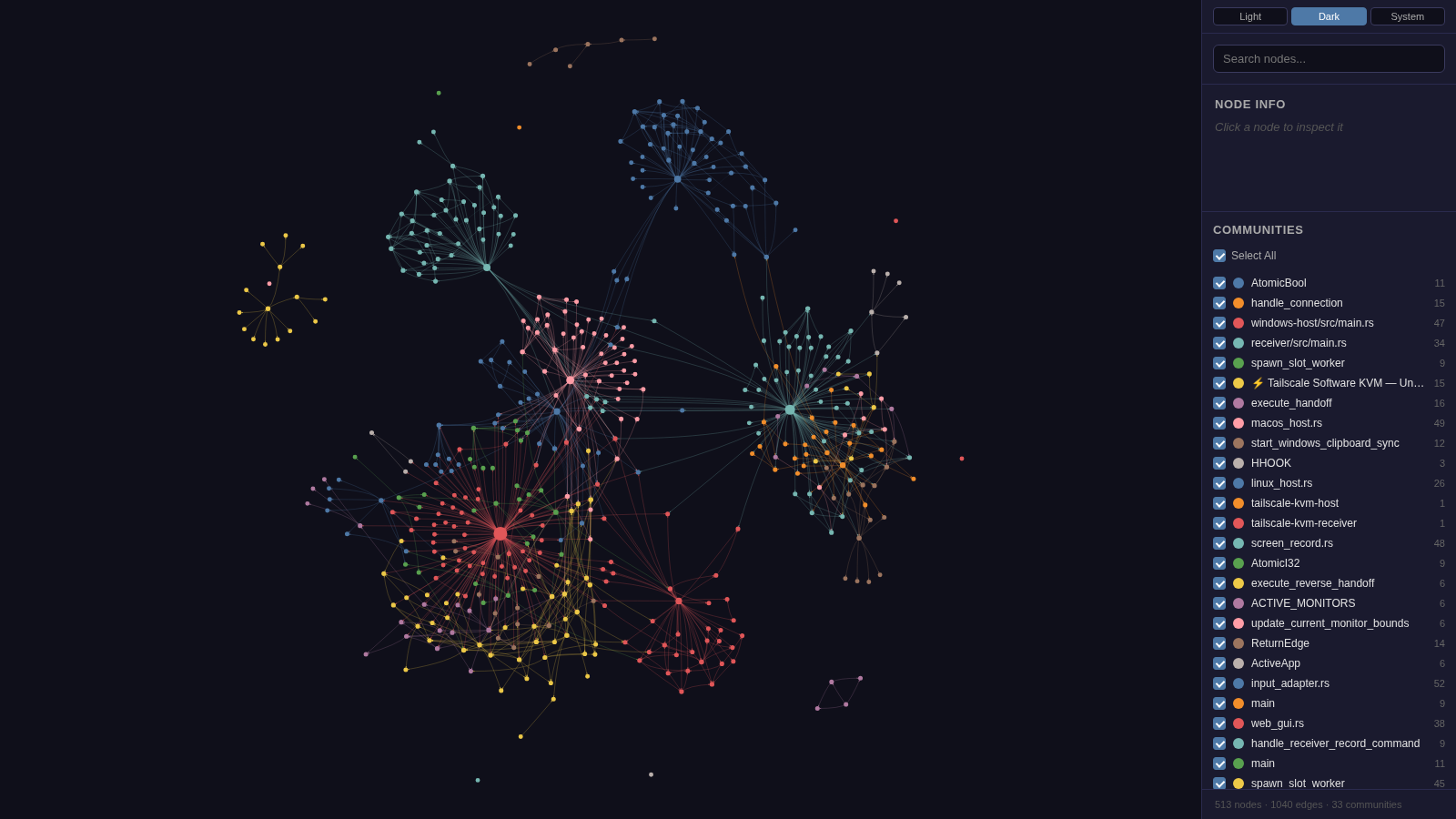
This repository includes pre-computed Graphify structural code graphs (graphify-out/) for architecture exploration:
# Refresh AST & architecture graph after code changes
graphify update .

# Export interactive Mermaid call-flow documentation
graphify export callflow-html
📄 License
Distributed under the MIT License.