Senior Project




Project Overview
Full-stack cryptocurrency analytics and portfolio tracking platform featuring microservices, real-time market data ingestion, and Groq AI sentiment analysis.
Architecture & Engineering Notes
Crypton — Crypto Market Dashboard
















Senior Capstone Project
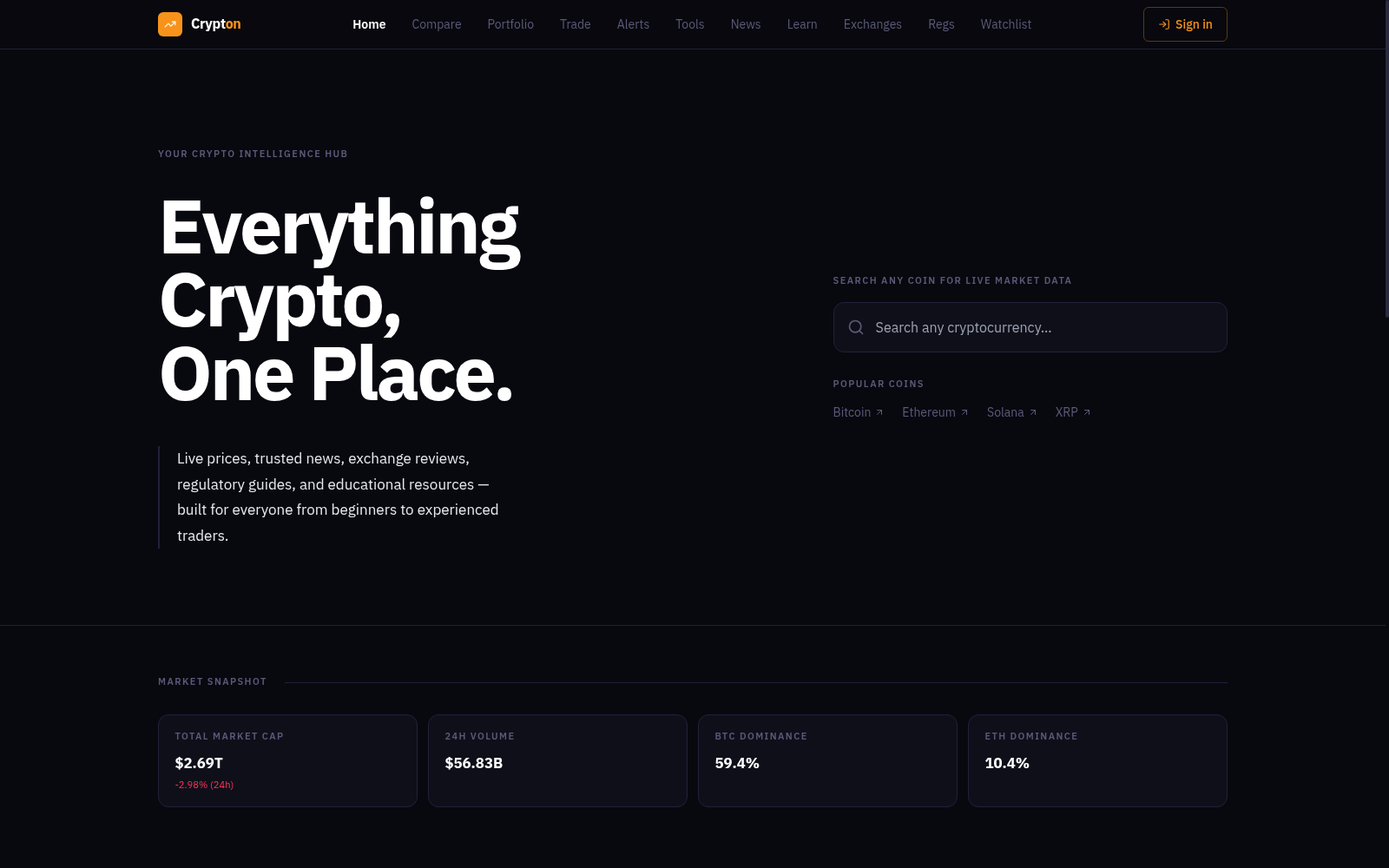
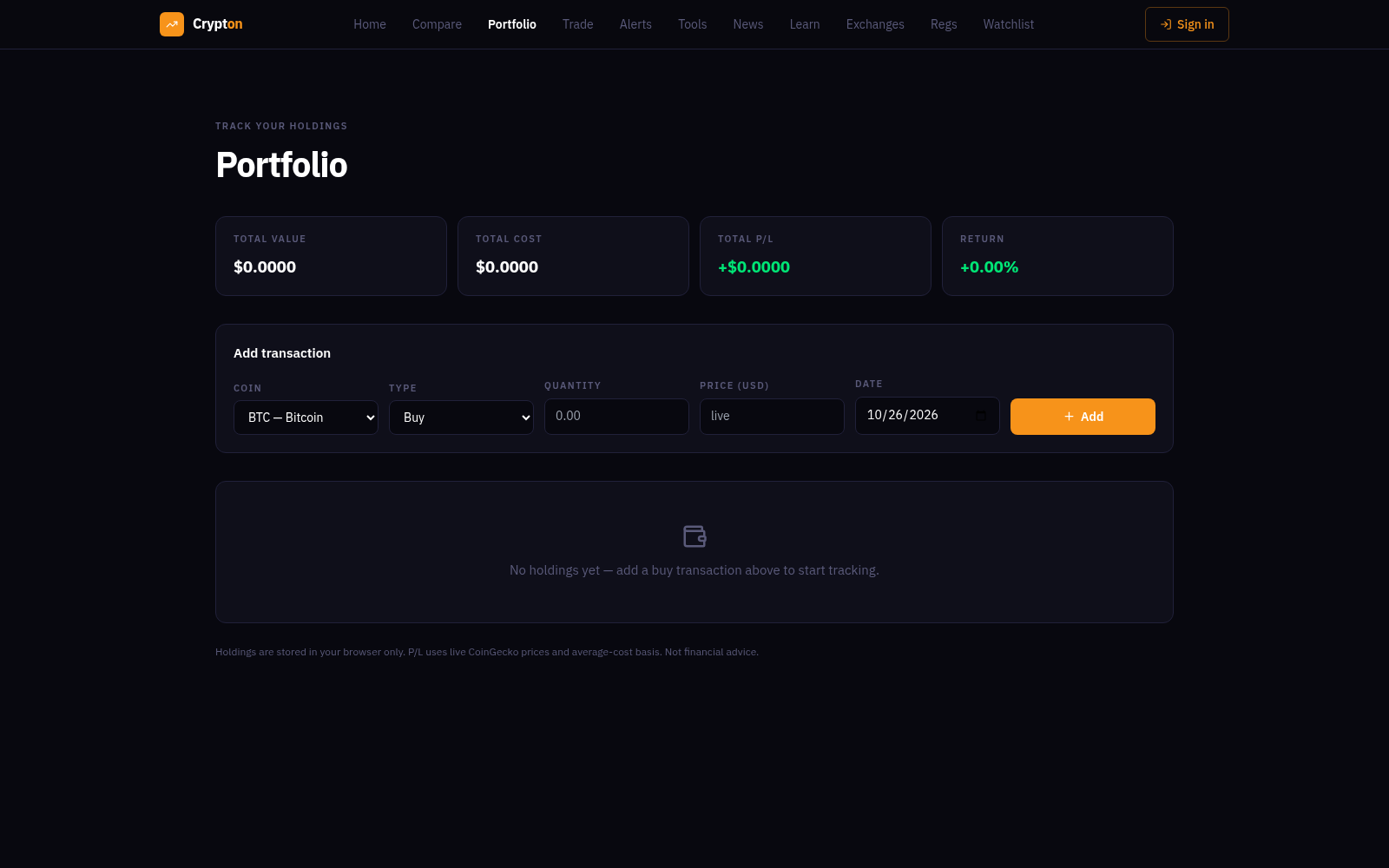
Crypton is a full-stack cryptocurrency analytics platform built as a Senior Capstone project. The application provides live cryptocurrency market data, historical price charts, secure multi-factor authentication (TOTP), personalized watchlists, cryptocurrency comparisons, curated news from trusted industry sources, AI-powered sentiment analysis, paper trading simulation, portfolio tracking with average-cost basis, DCA calculators, tax estimators, and crypto regulatory information across global jurisdictions. The project demonstrates modern React development, REST API integration, responsive UI design, Twelve-Factor App principles, and a three-tier architecture spanning Java Spring Boot, Python FastAPI, and React + TypeScript.
Table of Contents
- Live Market Data
- Features
- Tech Stack
- Architecture
- Installation
- Environment Variables
- Available Scripts
- Data Sources
- Authentication
- Backend Integration
- Project Structure
- Design System
- Why I Built This
- Known Limitations
- Future Enhancements
- Team
Live Market Data


Features
Market Data & Analytics
- 📈 Live cryptocurrency prices from CoinGecko API (server-side proxy with 60s in-memory caching)
- 🔍 Search over thousands of cryptocurrencies by name or ticker
- 📊 Advanced price + volume charts with 24H / 7D / 30D / 1Y / Max ranges via Recharts
- 🌍 Market overview — global market cap, BTC/ETH dominance, top gainers & losers
AI-Powered Insights (Python FastAPI Backend)
- 🤖 AI market sentiment analysis using Groq's Llama 3.3 70B model — Bullish/Neutral/Bearish classification with confidence scores, catalysts & risks
- 📰 News aggregation from CoinDesk, CoinTelegraph, Decrypt, Bitcoin Magazine, Blockworks, and CryptoSlate RSS feeds
- 🧠 AI article analysis: downloads articles via
newspaper3k, falls back to Tavily search when content is insufficient - 🎯 Crypto personality quiz — answers a quiz and receives personalized coin recommendations based on investor personality type
Portfolio & Trading
- 💼 Portfolio tracker — full transaction history, average-cost basis (weighted), live P/L per holding and total, allocation donut chart
- 🎮 Paper trading simulator — $100k virtual cash, live-price order fills at 60s intervals, positions with cost averaging, real-time P/L tracking
- 🔔 Price alerts — above/below target prices polled every minute while the app is open, with browser push notifications
Tools & Utilities
- 🧮 DCA Calculator — historical dollar-cost averaging projections with configurable frequency (weekly/biweekly/monthly) and duration
- 💱 Crypto/Fiat Converter — convert between 7 fiat currencies (USD, EUR, GBP, JPY, CAD, AUD, CHF) and any supported cryptocurrency
- 🧾 Tax Estimator — estimate short-term vs. long-term capital gains tax based on US federal rates (22% / 15%)
- 📤 CSV export for watchlist, portfolio transactions, paper trading history, and trade logs
Information & Education
- ⚖️ Exchange comparison platform — curated list of exchanges with filter tabs: All, Popular, Advanced, Low Fee, DeFi/DEX
- 📜 Global crypto regulations — jurisdiction-by-jurisdiction breakdowns (US, EU, UK, Japan, Singapore, etc.) with legal status, key points, tax treatment, and official resource links
- 📚 Learn center — expandable guide cards covering wallets, exchanges, DeFi, security, staking, NFTs, and more
Authentication & User Experience
- 🔐 Multi-Factor Authentication (TOTP) with brute-force lockout protection
- 👤 User profiles with persistent search history
- ⭐ Personal watchlist with persistent storage via Spring Boot backend
- 💬 Forgot password flow with MFA verification
- 🌙 Dark/Light theme support and a fully responsive interface across all screen sizes
Testing & Quality
- ✅ Vitest unit tests for portfolio average-cost math, paper trading buy/sell logic, CSV export formatting, and more
Tech Stack
Frontend
| Technology | Version | Purpose |
|---|---|---|
| React | 18.3 | UI framework with hooks and context |
| TypeScript | 5.4+ | Type-safe development |
| Vite | 5.2 | Fast build tool and dev server |
| Tailwind CSS | 3.4 | Utility-first responsive styling |
| React Router | v6.23 | Client-side routing with protected routes |
| Recharts | 2.12 | Declarative charting (price/volume, allocation donut) |
| Lucide React | 0.383 | Icon library |
| otpauth | 9.5 | TOTP secret generation for MFA setup |
| qrcode.react | 4.2 | QR code rendering for MFA setup |
Backend — Java Spring Boot
| Technology | Version | Purpose |
|---|---|---|
| Spring Boot | 3.2 | REST API framework |
| Spring Data JPA | — | ORM with Hibernate |
| SQLite | 3.44 | Embedded database for user data, watchlists, sentiment cache |
| Jackson | — | JSON serialization/deserialization |
| dev.samstevens.totp | 1.7.1 | TOTP secret generation and verification |
Backend — Python FastAPI (AI Service)
| Technology | Version | Purpose |
|---|---|---|
| FastAPI | 0.116+ | Async REST API for AI analysis |
| Uvicorn | 0.35+ | ASGI server |
| Groq SDK | 0.9+ | Llama 3.3 70B inference (sentiment + personality quiz) |
| Tavily | 0.3+ | Semantic news search fallback |
| newspaper3k | 0.28+ | Article text extraction from URLs |
| lxml / BeautifulSoup4 | — | HTML parsing for article scraping |
Environment & Dev Tools
| Tool | Purpose |
|---|---|
| Vitest | Frontend unit test runner (CSV, portfolio math, paper trading) |
| Maven | Java build tool and dependency manager |
| pip / venv | Python package management |
Architecture
Crypton follows a three-tier architecture with two backend services:
graph TD
    A[React 18 + TypeScript<br/>Tailwind CSS + Vite] -->|HTTP/JSON| B(Spring Boot REST API)
    B -->|HTTP/JSON| C[Python FastAPI AI Service]
    B --> D[(SQLite Database)]
    C --> E[Groq Llama 3.3<br/>70B Model]
    C --> F[Tavily Search]
    B --> G[CoinGecko API]
    B --> H[RSS Feeds]
User Flow
graph LR
    A[Search a coin] --> B[Add to Watchlist]
    B --> C[View AI Sentiment]
    C --> D[Paper Trade]
    D --> E[Track in Portfolio]
Data Flow
- Market data: Frontend → Spring Boot
/api/coingecko/*(server-side proxy with caching) → CoinGecko API - AI sentiment: Frontend → Python FastAPI
/classify→ Groq Llama 3.3 + Tavily search → result cached in SQLite via Spring Boot/api/sentiment/{ticker} - User data: Frontend ↔ Spring Boot REST endpoints (auth, watchlist) stored in SQLite
- News aggregation: Python FastAPI downloads RSS articles via
newspaper3k, falls back to Tavily when content is insufficient
Installation
Prerequisites
- Node.js 18+ and npm (for the frontend)
- Java 17+ and Maven (for the Spring Boot backend — optional, can run without it)
- Python 3.9+ (for the AI service backend — optional)
Frontend
git clone https://github.com/your-repository/crypton.git

cd frontend

npm install

cp .env.example .env

# Edit .env with your API keys and backend URLs, then:

npm run dev
The application will be available at:
http://localhost:5173
Backend — Java Spring Boot (Optional)
cd backend

mvn spring-boot:run
The REST API will be available at http://localhost:8080 by default.
Backend — Python FastAPI AI Service (Optional)
cd backend/python

python -m venv venv
venv\Scripts\activate   # Windows
# or: source venv/bin/activate  # macOS/Linux

pip install -r requirements.txt

cp .env.example .env    # Add your Groq and Tavily API keys

uvicorn main:app --reload
The AI service will be available at http://localhost:8000.
Environment Variables
Create a .env file from .env.example.
Frontend .env
| Variable | Description | Default |
|---|---|---|
VITE_API_URL |
Java/Spring Boot backend URL (auth, watchlist, CoinGecko proxy, sentiment cache) | — |
VITE_PYTHON_API_URL |
Python/FastAPI AI service URL (/classify, /personality-quiz) |
— |
VITE_APP_NAME |
Application name displayed in the UI | Crypton |
Backend — Spring Boot (Optional)
| Variable | Description | Default |
|---|---|---|
COINGECKO_API_KEY |
CoinGecko API key for server-side proxy requests | Demo key included |
DB_URL |
SQLite database URL | jdbc:sqlite:./crypton.db |
Backend — Python FastAPI (Optional)
| Variable | Description | Required |
|---|---|---|
GROQ_API_KEY |
Groq API key for Llama 3.3 inference | ✅ Yes |
TAVILY_API_KEY |
Tavily search API key for news fallback | Recommended |
Available Scripts
Frontend (frontend/)
npm run dev
Starts the Vite development server with hot module replacement at http://localhost:5173.
npm run build
Compiles TypeScript and creates a production-optimized build in dist/.
npm run preview
Serves the production build locally for testing.
npm test
Runs the Vitest unit suite covering CSV export formatting, portfolio average-cost math, paper trading buy/sell logic, and more. Also runs in CI on every push and PR.
Backend — Spring Boot (backend/)
mvn spring-boot:run
Starts the Java REST API server at http://localhost:8080.
Backend — Python FastAPI (backend/python/)
uvicorn main:app --reload
Starts the AI service at http://localhost:8000 with auto-reload during development.
Data Sources
Market Data
| Source | Type | Purpose |
|---|---|---|
| CoinGecko API | REST (v3) | Live prices, market charts, search, trending coins |
| CryptoCompare API | REST | Alternative price data with higher rate limits |
News & Sentiment
| Source | Type | Purpose |
|---|---|---|
| CoinDesk RSS | Feed | Major crypto news aggregation |
| CoinTelegraph RSS | Feed | Industry analysis and market updates |
| Decrypt RSS | Feed | DeFi-focused news coverage |
| Bitcoin Magazine RSS | Feed | Bitcoin-specific reporting |
| Blockworks RSS | Feed | Institutional crypto insights |
| CryptoSlate RSS | Feed | Market data and regulatory news |
AI Analysis Pipeline
- Article Download: Python FastAPI uses
newspaper3kto extract readable text from RSS article URLs - Fallback Search: If articles contain insufficient content (< 500 chars), Tavily semantic search retrieves additional relevant articles
- AI Classification: Groq's Llama 3.3 70B model analyzes all collected articles and returns:
- Overall sentiment classification (Bullish/Neutral/Bearish)
- Confidence score (0-100%)
- Market score (-100 to +100)
- Bullish catalysts and bearish risks
- Short-term and long-term outlook
- Caching: Results are stored in SQLite via Spring Boot's sentiment cache endpoint for reuse
Authentication
Crypton implements secure two-factor authentication using Time-based One-Time Passwords (TOTP) with a multi-step login flow.
Security Measures
| Feature | Implementation |
|---|---|
| Password Hashing | PBKDF2 with SHA-256 for strong password storage |
| MFA Setup | TOTP secret generation via dev.samstevens.totp library, QR code rendering with qrcode.react |
| Login Flow | Two-step process: Step 1 verifies username/password, Step 2 verifies MFA token |
| Brute-Force Protection | Account lockout after repeated failed login attempts |
| Password Reset | Secure reset flow requiring MFA verification before allowing password change |
Login Steps
- Step 1: User enters username and password → server validates credentials
- Step 2: Server sends TOTP code to user's authenticator app → user verifies with MFA token
- Success: User is authenticated and can access protected routes
Setup Flow
- New users register with a generated MFA secret (displayed as QR code)
- Users scan the QR code with an authenticator app (Google Authenticator, Authy, etc.)
- Users enter a test TOTP code to complete setup
- From then on, every login requires both password and current TOTP code
Backend Integration
Setting VITE_API_URL and VITE_PYTHON_API_URL automatically routes frontend requests to the appropriate backend services without modifying application code.
Spring Boot REST Endpoints (/api/auth)
| Method | Endpoint | Description |
|---|---|---|
GET |
/health |
Service health check |
GET |
/mfa/setup/{username} |
Generate MFA secret + QR code for setup |
POST |
/register |
Register new user with email, password, and optional MFA |
POST |
/login/step1 |
Verify username and password (first step of login) |
POST |
/login/step2 |
Verify TOTP code (second step of login) |
POST |
/reset-password |
Reset password with MFA verification |
GET |
/watchlist/{username} |
Get user's watchlist coins |
POST |
/watchlist/{username} |
Update user's watchlist coins |
Spring Boot CoinGecko Proxy (/api/coingecko)
All requests are forwarded server-to-server to avoid CORS issues from GitHub Pages:
| Method | Endpoint | Upstream | Description |
|---|---|---|---|
GET |
/markets |
/coins/markets |
Live market data (prices, volumes, changes) |
GET |
/market_chart/{id} |
/coins/{id}/market_chart |
Historical price + volume charts |
GET |
/search |
/search |
Search cryptocurrencies by name/ticker |
60-second in-memory caching reduces CoinGecko API calls when multiple clients request the same data.
Spring Boot Sentiment Cache (/api/sentiment)
| Method | Endpoint | Description |
|---|---|---|
GET |
/sentiment/{ticker} |
Get cached AI sentiment for a coin |
POST |
/sentiment/{ticker} |
Save AI sentiment result to SQLite database |
GET |
/sentiment |
Get all cached sentiments |
Python FastAPI Endpoints (/api)
| Method | Endpoint | Description |
|---|---|---|
GET |
/ |
Service health check |
GET |
/test |
Test Groq connectivity (returns "Hello!") |
POST |
/classify |
Analyze cryptocurrency news articles → sentiment + outlook |
POST |
/personality-quiz |
Process quiz answers → investor personality type + coin recommendations |
Supported Coins for AI Analysis
Bitcoin, Ethereum, Solana, XRP, Dogecoin, Cardano, Avalanche, Chainlink, Polkadot, Litecoin, Binance Coin, Shiba Inu, Uniswap
Project Structure
Click to expand full project structure
SeniorProject/
├── start.ps1                          # PowerShell startup script for local development
├── .env.example                       # Environment variable template (never commit)
├── README.md                          # This file
│
├── frontend/                          # React 18 + TypeScript application (Vite)
│   ├── src/
│   │   ├── components/                # Reusable UI components
│   │   │   ├── CoinCard.tsx           # Individual coin display card with price/change
│   │   │   ├── ErrorBoundary.tsx      # React error boundary for graceful failure handling
│   │   │   ├── MarketOverview.tsx     # Global market stats (cap, dominance, top movers)
│   │   │   ├── Navbar.tsx            # Navigation bar with theme toggle and user menu
│   │   │   ├── NewsCard.tsx          # Individual news article card
│   │   │   ├── ProtectedRoute.tsx    # Route guard requiring authentication
│   │   │   ├── SearchBar.tsx         # Coin search input with live results
│   │   │   ├── Skeleton.tsx          # Loading skeleton placeholders
│   │   │   └── TickerStrip.tsx       # Horizontal ticker tape of trending coins
│   │   ├── context/                   # React Context providers for global state
│   │   │   ├── AlertsContext.tsx      # Price alert management and browser notifications
│   │   │   ├── AppContext.tsx         # Global app settings (theme, display currency)
│   │   │   ├── AuthContext.tsx        # Authentication state and login/logout flow
│   │   │   ├── FeatureProviders.tsx   # Feature flag provider
│   │   │   ├── PaperTradingContext.test.ts  # Unit tests for paper trading logic
│   │   │   ├── PaperTradingContext.tsx    # Virtual cash, positions, buy/sell operations
│   │   │   ├── PortfolioContext.test.ts     # Unit tests for portfolio math
│   │   │   ├── PortfolioContext.tsx        # Transaction history, holdings, P/L calculations
│   │   │   └── SavedNewsContext.tsx        # Bookmarked articles persistence
│   │   ├── lib/                       # Utility modules and data mappings
│   │   │   ├── api.ts                 # API client with request/response types
│   │   │   ├── apiRequest.ts          # HTTP request helper (fetch wrapper)
│   │   │   ├── auth.ts                # Authentication helpers (token management)
│   │   │   ├── coinDescriptions.ts    # Coin name/ticker mapping data
│   │   │   ├── coinMapping.ts         # Full COINS array with metadata for AI analysis
│   │   │   ├── csv.test.ts            # Unit tests for CSV export formatting
│   │   │   ├── csv.ts                 # CSV download utility (watchlist, portfolio, trades)
│   │   │   ├── displayCurrency.ts     # Multi-currency formatting (USD/EUR/GBP/JPY/BTC/ETH)
│   │   │   ├── exchangeData.ts        # Exchange platform data with tags and descriptions
│   │   │   ├── learnData.ts           # Educational guide content for Learn page
│   │   │   ├── logger.ts              # Logging utility
│   │   │   ├── rateLimit.ts           # Rate limiting helpers for API calls
│   │   │   ├── regulationData.ts      # Global crypto regulatory data by jurisdiction
│   │   │   └── useTheme.ts            # Theme hook (dark/light toggle)
│   │   └── pages/                     # Page-level components (one per route)
│   │       ├── Alerts.tsx             # Price alert setup and triggered alerts list
│   │       ├── CoinPage.tsx           # Individual coin detail page with charts & sentiment
│   │       ├── Compare.tsx            # Side-by-side 2-coin comparison
│   │       ├── Exchanges.tsx          # Exchange platform directory with filters
│   │       ├── ForgotPassword.tsx     # Password reset flow with MFA verification
│   │       ├── Home.tsx               # Landing page with market overview & trending coins
│   │       ├── Learn.tsx              # Expandable educational guide cards
│   │       ├── Login.tsx              # Two-step login (password + TOTP)
│   │       ├── News.tsx               # News feed with source/keyword filters and bookmarks
│   │       ├── PaperTrading.tsx       # Virtual cash trading simulator ($100k starting balance)
│   │       ├── Portfolio.tsx          # Transaction history, holdings, P/L, allocation donut
│   │       ├── Profile.tsx            # User profile with search history
│   │       ├── Register.tsx           # Registration with MFA setup (QR code)
│   │       ├── Regulations.tsx        # Global crypto regulatory information by jurisdiction
│   │       ├── Results.tsx            # Quiz results display
│   │       ├── Tools.tsx              # DCA calculator, currency converter, tax estimator
│   │       └── Watchlist.tsx          # Starred coins list with persistent storage
│   ├── public/                        # Static assets and 404.html SPA fallback
│   ├── package.json                   # Dependencies: React, Recharts, Lucide, otpauth, qrcode.react
│   ├── vite.config.ts                 # Vite config with path aliases (@) and base URL
│   ├── tsconfig.json                  # TypeScript strict configuration
│   ├── tsconfig.node.json             # Node-specific TS config for Vite plugins
│   ├── vitest.config.ts               # Vitest test runner configuration
│   └── tailwind.config.js             # Tailwind theme (navy, orange accent, green/red indicators)
│
├── backend/                           # Java Spring Boot + Python FastAPI backends
│   ├── pom.xml                        # Maven config: Spring Boot 3.2, JPA, SQLite, TOTP library
│   │
│   └── src/main/java/com/crypton/     # Spring Boot application code
│       ├── CryptonApplication.java    # @SpringBootApplication entry point
│       ├── config/CorsConfig.java     # CORS whitelist for frontend origins
│       │
│       └── controller/                # REST API controllers
│           ├── AuthController.java    # 8 endpoints: health, MFA setup, register, login (2-step), reset-password, watchlist CRUD
│           ├── CoinGeckoController.java  # Server-side proxy with 60s in-memory cache
│           ├── SentimentCacheController.java     # GET/POST sentiment for individual coins + all cached
│           └── SentimentCacheTopController.java  # Top coin by market score
│       │
│       ├── model/                     # JPA entity classes
│       │   ├── CoinSentimentCache.java    # AI sentiment result stored in SQLite
│       │   └── User.java                  # User account with username, email, password hash, MFA secret
│       │
│       ├── repository/                # Spring Data JPA repositories
│       │   ├── CoinSentimentCacheRepository.java
│       │   └── UserRepository.java
│       │
│       └── service/                   # Business logic layer
│           ├── AuthService.java        # Registration, login (2-step), password reset, watchlist management
│           ├── MfaService.java         # TOTP secret generation and verification
│           └── SentimentCacheService.java  # Cache get/set/top queries for AI sentiment results
│       │
│   ├── src/main/resources/            # Spring Boot configuration files
│   │   └── application.properties     # Database URL, server port, CoinGecko API key
│   │
│   └── python/                        # Python FastAPI AI service (port 8000)
│       ├── main.py                    # Full FastAPI app: /classify, /personality-quiz, /test endpoints
│       ├── requirements.txt           # Dependencies: fastapi, uvicorn, groq, tavily-python, newspaper3k, lxml, bs4
│       ├── Procfile                   # Heroku deployment configuration (web: uvicorn main:app)
│       └── instructions.md            # Step-by-step setup guide for the AI backend
Key Files Explained
| File | Purpose |
|---|---|
start.ps1 |
PowerShell script to start both Spring Boot and FastAPI backends in parallel |
.env.example |
Template for all required environment variables (frontend + both backends) |
frontend/src/lib/coinMapping.ts |
Central coin metadata: ticker, name, description, category — used by AI analysis, search, and display |
backend/python/main.py |
Groq Llama 3.3 inference pipeline with Tavily fallback for news sentiment analysis |
Design System
Crypton uses a custom Tailwind CSS theme with the following color palette:
| Token | Hex Value | Usage |
|---|---|---|
| Navy | #08080F |
Primary page background (dark theme) |
| Surface | #0F0F1A |
Card and panel backgrounds |
| Border | #21213A |
Borders, dividers, and outlines |
| Orange Accent | #F7931A |
Primary buttons, links, highlights, alert notifications |
| Bullish Green | #00E676 |
Positive price changes, gains, profit indicators |
| Bearish Red | #FF3355 |
Negative price changes, losses, loss indicators |
| Watchlist Gold | #FFB020 |
Favorite/watchlist star indicators |
| Muted Gray | #5A5A7A |
Secondary text and icons |
| White | #FFFFFF |
Primary text on dark backgrounds |
Typography & Spacing
- Font: System font stack (San Francisco, Segoe UI, Roboto)
- Border radius: 8–12px for cards and panels
- Section padding: 5rem vertical with 1.5rem horizontal
- Responsive breakpoints: Mobile-first with
md:and responsive clamp() values
Why I Built This
Known Limitations
- No server-side session tokens yet — per-user endpoints currently rely on local storage rather than authenticated sessions
- Price and alert data is polled on an interval rather than pushed via WebSocket, so updates can lag by up to 60 seconds
- AI sentiment analysis is currently limited to the 13 coins listed in
coinMapping.ts - No automated end-to-end test coverage yet (component/E2E tests are Vitest-only, unit-level)
Future Enhancements
- Server-side session tokens so per-user endpoints are authenticated (currently uses local storage)
- TradingView-grade charting library for advanced technical analysis indicators
- Native mobile application (React Native or Flutter)
- Installable PWA with offline support and service worker caching
- Wider automated test coverage: component tests, E2E tests with Playwright/Cypress
- WebSocket real-time price updates instead of polling
- Multi-language/i18n support
- CoinGecko Pro API integration for higher rate limits


