Visual Compare Chrome Extension


Project Overview
Chrome extension for real-time dual-site visual regression and interaction testing with synchronized scrolling, split-swipe curtain, and mirrored user actions.
Architecture & Engineering Notes
VisualCompare Live — Chrome Extension
A real-time dual-site visual regression and interaction testing extension for Google Chrome. Load any two URLs (Production vs. Staging, Localhost vs. Remote) side-by-side with mirrored user interactions, synchronized scrolling, split swipe curtain, flicker toggle, and pixel-diff overlays.
✨ Features
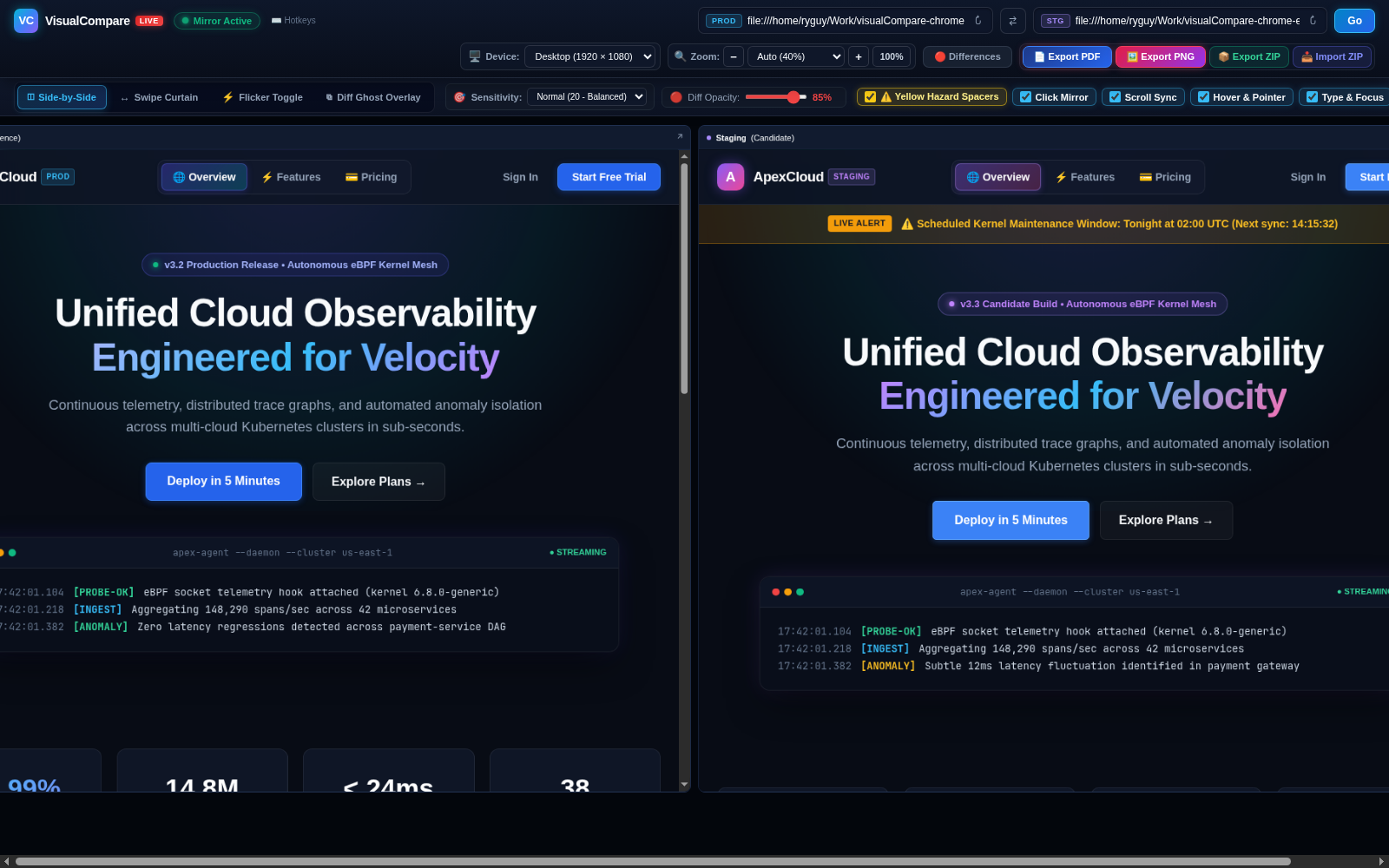
- Viewport (X, Y) Mirrored Click & Interaction Engine: Click any button, dropdown, navigation link, tab, or modal on one site, and the action is mirrored in real time onto the counterpart site on a viewport-based (X, Y) basis rather than class or ID matching. This ensures clicks work accurately even across redesigned sites with different class names, hashed styles, dynamic IDs, or varied text.
- Synchronized Scrolling & Typing: Scroll positions and form inputs are mirrored synchronously between both frames with loop-prevention.
- Ghost Pointer Cursor: A real-time glowing cursor indicator reflects your mouse movement onto the counterpart site.
- 4 Live Comparison Modes:
- Side-by-Side (Sync): 50/50 dual pane layout for simultaneous browsing and manual testing.
- Swipe Split Curtain: Drag a vertical divider handle across overlapping live frames to reveal micro-differences.
- Flicker Toggle: Rapidly switch between Production and Staging (automatically or via Space) to spot subtle layout shifts.
- Diff Ghost Overlay: Layer Staging directly on top of Production with an interactive Opacity Slider (0%–100%) and Difference blend mode.
- Subpixel Pixel-Diff Engine (
diff_engine.pyParity): Highlights strictly individual differing pixels in Red (#e11d48) with 8-neighbor subpixel anti-aliasing rejection across Side-by-Side (3rd Column Black Canvas or Underlaid Page), Swipe Curtain (PROD ↔ DIFF), and Diff Ghost Overlay modes—never painting solid red bounding boxes over cards or buttons—with live Sensitivity (High/Normal/Low/Loose) and Diff Opacity (0%–100%) controls. - DOM-Aware Layout Shift & Yellow Hazard Stripe Spacers: Ports the alignment engine from VisualCompare Python (
diff_engine.py,matcher.py,dom_extractor.js). When vertical space is added to one site (e.g. promotional alert banner, dynamic ticker, larger padding), the engine detects the landmark discrepancy and automatically inserts a clean Yellow Hazard Stripe Spacer (#facc15diagonal warning stripes) into the shorter counterpart to absorb the layout shift, keeping all content below aligned 1:1 and showing the exact shifted pixel delta on hover. - Interactive Unified Controls Area:
- Clickable Mirror Active / Paused status badge in the header to pause or resume all mirror channels at once.
- Contextual active highlighting on the Sensitivity and Diff Opacity controls whenever 🔴 Differences is enabled.
- One-click reset on the Diff Opacity (
85%) and Ghost Overlay Opacity (80%) percentage readouts, plus a clickable Mismatch metric badge and hover tooltip on ⚠️ Yellow Spacers showing total shifted pixels. - Double-click the Swipe Curtain handle to snap back to
50%center, or use ← / → (Shift for1%steps) in Swipe mode. - Unified Fixed-Size Zoom Control (
−/Scale/+/100%) & Column Focus (⤢): A single fixed-size zoom control in the top header zooms all panels simultaneously (50%–300%) without ever shrinking or changing size across device presets or window widths. You can also use Ctrl/Cmd + mouse wheel over a column, or double-click any column header title to maximize a single column to full stage width.
- Dynamic Scroll-Loaded Differences & Full Color Regression Detection:
- Streams and merges DOM diff candidates dynamically as you scroll down the page so lazy-loaded sections and below-the-fold elements are diffed immediately in real time.
- Detects and renders subpixel differences for solid backgrounds, CSS gradients (
linear-gradient/radial-gradient), text colors, gradient text (background-clip: text), per-side border/outline colors, box shadows, and SVGfill/strokecolors acrossrgb/rgba,hex, andhsl/hsla.
- Universal Frame Support: Uses Chrome's
declarativeNetRequestAPI to relaxX-Frame-Optionsand CSPframe-ancestorsfor frames inside Studio tabs only (never normal browsing), so the sites you approve can load inside the studio. - Tight, user-controlled permissions: No site access is granted at install. You choose in the popup: only the two sites being compared (default), all sites, or all sites except a list. See Permissions & Privacy.
- Device Viewport Emulation: Easily test Desktop (1920×1080), Laptop (1366×768), Tablet (768×1024), and Mobile (440×956).
🚀 How to Install in Chrome
- Open Google Chrome (or Edge / Brave / Chromium).
- Navigate to:
chrome://extensions - Enable Developer mode toggle in the top-right corner.
- Click Load unpacked in the top-left corner.
- Select this project directory:
C:\YOUR_PATH\visualCompare-chrome-extension - The VisualCompare Live extension icon will now appear in your browser toolbar! Pin it for quick access.
📖 How to Use
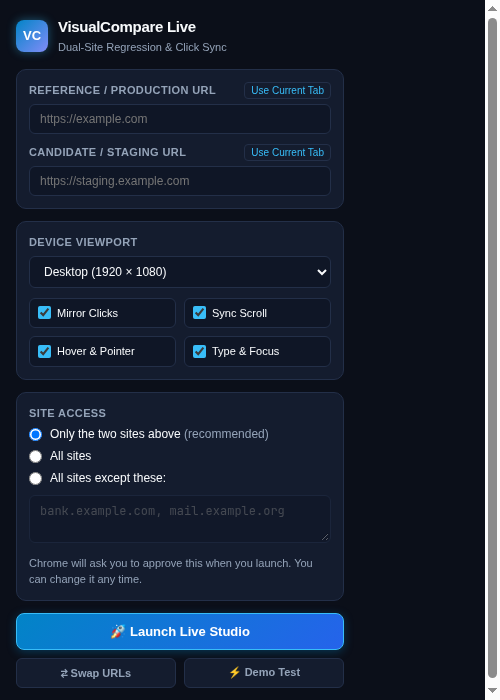
- Click the VisualCompare extension icon in your browser toolbar.
- Enter your Reference / Production URL and Candidate / Staging URL:
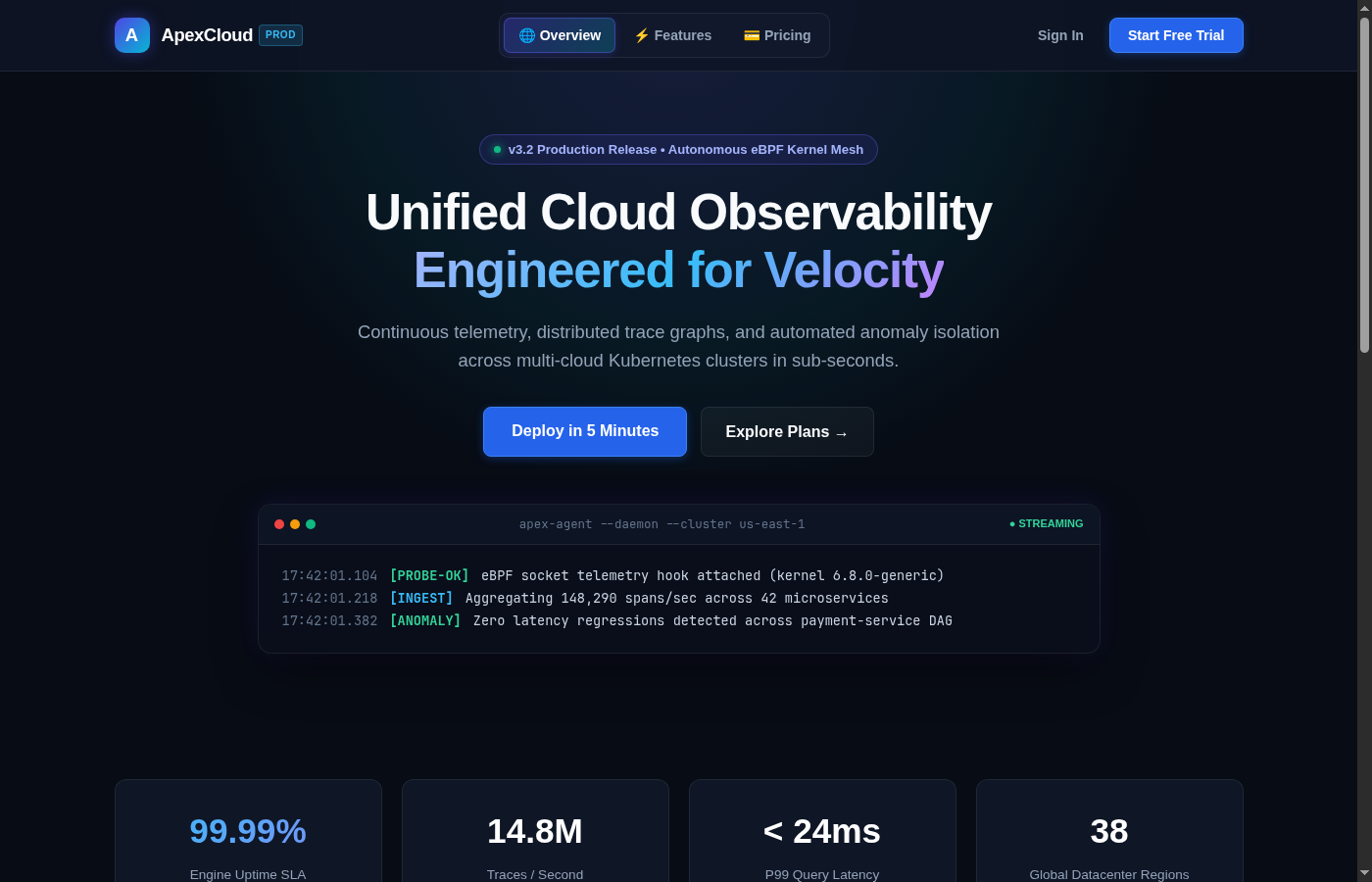
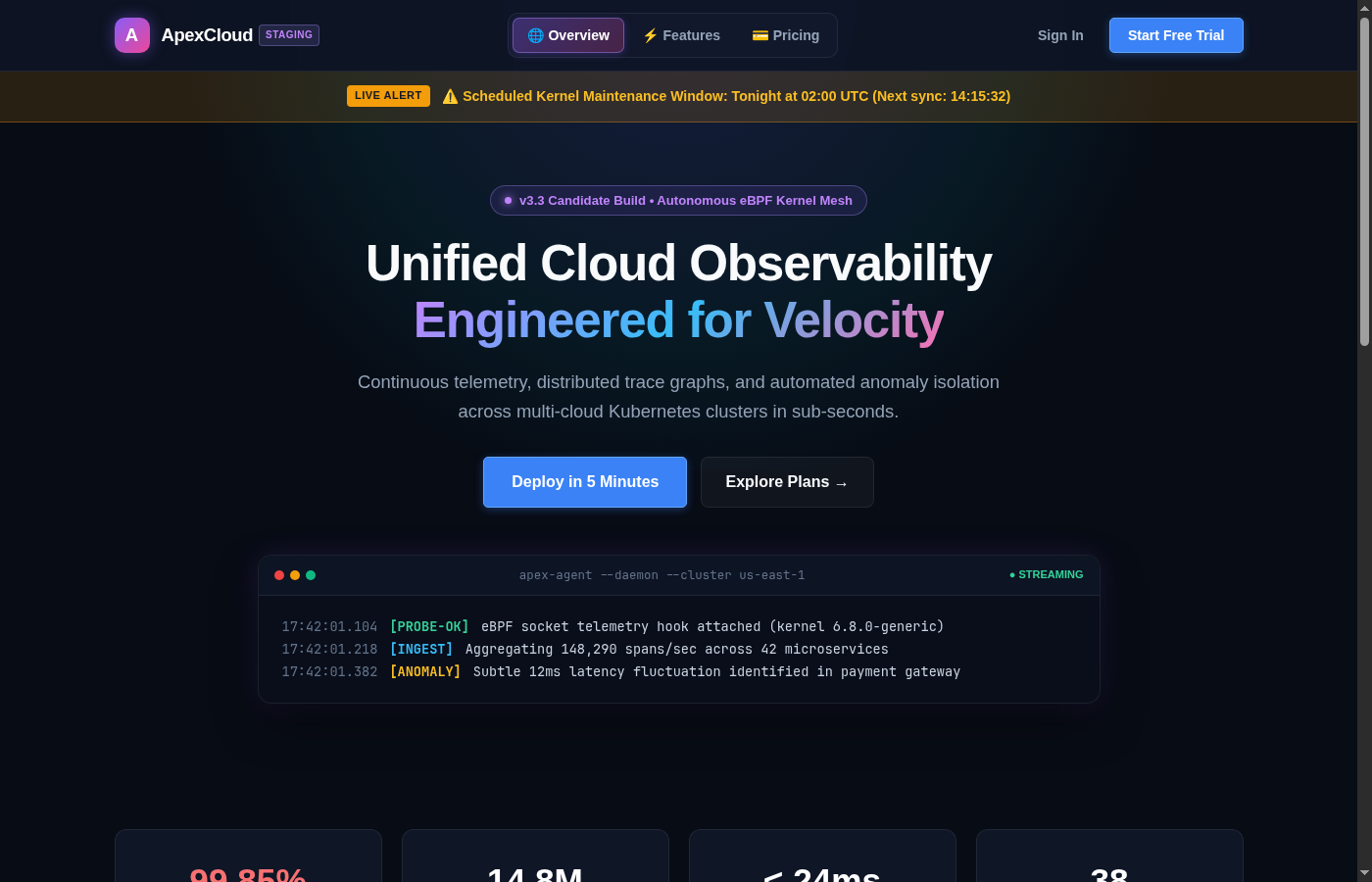
- Click "⚡ Demo Test" to instantly load the built-in ApexCloud benchmark (
demo_prod.htmlvsdemo_stg.html), which tests an added alert banner and button regressions. - Or click "Use Current Tab" to test live external websites.
- Click "⚡ Demo Test" to instantly load the built-in ApexCloud benchmark (
- Choose your device viewport and toggle desired sync features (Hazard Spacers, Clicks, Scroll, Ghost Cursor, Typing).
- Pick Site access (see below) and click "🚀 Launch Live Studio".
- Inside the Live Studio tab:
- Notice the Yellow Hazard Stripe Spacer automatically appear before the hero section on Production to absorb the added alert banner in Staging, keeping both pages in lockstep!
- Toggle ⚠️ Yellow Hazard Spacers in the toolbar to see the comparison with or without layout shift compensation.
- Switch between Side-by-Side, Swipe Split Curtain, Flicker Toggle, and Diff Ghost Overlay.
- Click "📸 Run Diff" to calculate pixel mismatch percentage with yellow hazard stripe visualization.
🗂️ Project Structure
| Path | Purpose |
|---|---|
manifest.json |
Manifest V3 config: minimal permissions, optional host access |
background.js |
Service worker; seeds defaults, registers the sync agent on approved sites, installs the Studio-tab-only header rule |
popup.html/js/css |
Toolbar popup: URL inputs, device, sync toggles, launches the studio |
studio.html/css |
Live Studio page markup and styles |
studio/*.js |
Studio controller, split into modules (see below) |
sync_agent.js |
Content script injected into every frame; reports/replays clicks, scroll, hover, typing |
zip_exporter.js |
Dependency-free ZIP/PDF export and import |
site_access.js |
Shared pure helpers: site-access modes, exclusion parsing, match-pattern plans |
PRIVACY.md |
Privacy policy (required for the Chrome Web Store) |
demo/ |
Built-in ApexCloud Production vs Staging demo pages (demo_prod*.html, demo_stg*.html) |
tests/ |
Node test suite and runner |
icons/ |
Extension icons |
_metadata/is generated by Chrome and is git-ignored.
🔐 Permissions & Privacy
Nothing is granted at install (host_permissions and content_scripts are gone). When you click Launch, the Studio opens and shows a Grant access banner; clicking it makes Chrome show the prompt for the access you chose under Site access. (The prompt is deliberately not requested from the popup: a popup closes when the prompt takes focus, which loses the request and leaves Chrome stuck.)
| Option | What Chrome is asked for | Enforcement |
|---|---|---|
| Only the two sites above (default) | Just those two hosts | Sync agent and header rule limited to them |
| All sites | All http(s) sites | Agent on every site; header rule only in Studio tabs |
| All sites except… | All http(s) sites | Chrome can't grant "all except", so the extension excludes your listed hosts (and their subdomains) itself: the agent isn't registered there and header rules skip them. Comparing an excluded site is refused. |
Details:
- Navigating to a new site from inside the Studio shows the same banner if permission is needed.
- The built-in demo pages need no site permission.
- Frame-header relaxing is a session rule limited to open Studio tabs and sub-frames. It is removed when the tab closes.
- Removed: the
tabspermission (usesactiveTab), global content script,web_accessible_resourcesand the staticrules.json. - Full policy: PRIVACY.md.
Chrome Web Store checklist
- Zip only runtime files:
manifest.json,*.js,*.html,*.css,icons/,demo/,studio/(excludetests/,package.json,_metadata/). - Host
PRIVACY.mdat a public URL and enter it in the listing. - Explain each permission in the store form using the table in
PRIVACY.md. - Fill in the data-disclosure form: no data collected or transmitted.
- Single purpose: "side-by-side visual comparison of two websites".
🧩 Studio Modules (studio/)
The studio controller used to be a single 5,700-line file. It is now split into classic scripts that studio.html loads in this order (they share one global scope, so order matters; no build step needed):
| File | Responsibility |
|---|---|
state.js |
DOM element references and shared state |
init_frames.js |
URL-param initialisation, iframe loading and agent handshake |
action_relay.js |
Cross-frame mirror engine (clicks, scroll, typing, hover) |
view_modes.js |
View mode switcher, swipe curtain, flicker, ghost overlay, keyboard shortcuts |
layout_alignment.js |
DOM landmark matching and yellow hazard-stripe spacers |
red_diff_detection.js |
Non-height (red) difference detection and mirroring |
diff_runner.js |
Hazard stripe canvas, Run Diff, pixel diff renderer |
pixel_diff_engine.js |
Element-level and subpixel pixel diff (port of Python diff_engine.py) |
viewport.js |
Device viewport presets, zoom, aspect-ratio fit |
navigation.js |
URL bar actions, navigation, sync chip styling |
export_import.js |
ZIP/PDF export and import |
main.js |
Startup; registers the tab as a Studio tab with the background worker, then loads the frames. Loads last |
When adding a module, add its <script> tag to studio.html in the right position. tests/test_studio_modules_load.js fails if a file is missing from, or extra in, that list.
🧪 Running Tests
No dependencies or build step are needed, only Node.js:
npm test                      # runs every tests/test_*.js
node tests/run_all.js swipe   # only tests whose filename contains "swipe"
The runner always executes tests from the extension root, so it works from any directory.
Several tests check the source of the studio modules, sync_agent.js and studio.html for required behaviour, so update them when you intentionally change those features.
📝 Changelog (cleanup)
- Renamed
scratch/totests/and addedtests/run_all.jspluspackage.json(npm test). - Moved demo pages into
demo/. Updatedmanifest.json,popup.js,studio.jsand the demo pages'sync_agent.jsscript path. - Added a project structure section to this README.
- Split
studio.jsintostudio/*.jsmodules (code unchanged apart from removing theDOMContentLoadedwrapper; startup calls moved tostudio/main.js). - Tests read the modules through
tests/helpers.js(readStudioJs()), which joins them in load order and re-wraps them in the original layout the regex-based tests expect. - Added
tests/test_studio_modules_load.js: checks the module list and, when Chromium is installed, bootsstudio.htmlheadlessly and fails on any uncaught error. - Tightened permissions: removed
<all_urls>host permission, global content script,tabs,web_accessible_resourcesand staticrules.json. Host access is now optional and chosen in the popup (only the two sites / all sites / all except a list). - Added
site_access.js, the popup Site access card, in-studio permission prompts for new sites, andPRIVACY.md. - Added
tests/test_site_access.js(parsing, plans, and background enforcement against a mocked Chrome API); updated the manifest assertions intest_comprehensive_platform_verification.js. - Fixed Chrome freezing on Launch Live Studio: the permission prompt moved from the popup to a Grant access banner in the Studio tab. Checked in headless Chromium with the extension loaded (demo and HTTP sites). The native prompt can't be shown headless, so click Grant access once in normal Chrome to confirm.
- Stabilized the Differences Engine (
studio/pixel_diff_engine.js,studio/red_diff_detection.js,studio/diff_runner.js,studio/action_relay.js,studio/view_modes.js,studio/navigation.js,studio/export_import.js):- Fixed
ALLOW_SOLID_BOX_DIFF,activeRenderFrame,liveTargetFrame, andisBlackCanvasscoping inrenderSwipeDiffCanvasandrenderPixelDiffColumn3so fallback and hazard-stripe paths never throwReferenceError. - Fixed
addDiffIfMissingdemo-site check (isDemo) and added finite/positive dimension guards inrenderElementSubpixelDiffandrenderDiffCanvasHeatmap. - Prevented background
VC_LANDMARKS_REPORTmessages andOverlaymode switches from auto-enabling differences when 🔴 Differences is off, and ensuredclearAllRedDiffsresets all diff state (isDiffActive, cached canvases, and overlay heatmap). - Connected the Sensitivity (
#diff-tolerance-select) and Diff Opacity (#col-diff-opacity-slider) controls so changes immediately invalidate stale buffers, scale element subpixel tolerance, and re-render across Side-by-Side 3rd Column, Swipe Curtain, and Diff Ghost Overlay modes.
- Fixed
- Improved the Studio Controls Area (
studio.html,studio.css,studio/navigation.js,studio/view_modes.js,studio/diff_runner.js) and addedtests/test_diff_stability_and_controls_improvements.js:- Made
#sync-statusa clickable master pause/resume toggle for all mirror channels with.pausedstyling. - Added
.diff-controls-activevisual highlighting on Sensitivity and Diff Opacity controls when Differences are enabled, pill grouping for Device/Scale and Export tools, click-to-reset on opacity percentage labels (85%/80%), clickable#metric-shift-badge, and Swipe Curtain double-click (50%) + ←/→ keyboard nudging.
- Made
- Eliminated Offset & Visual Difference Stutter and Synchronized 3rd-Column Height (
studio/pixel_diff_engine.js,studio/layout_alignment.js,studio/action_relay.js,studio/navigation.js,sync_agent.js,studio.css):- Added per-element subpixel diff bitmap caching (
item._subpixelCache) inrenderElementSubpixelDiffso 60fps scroll frames blit cached RGBA diff canvases directly without repeatinggetImageDataor CPU neighbor loops. - Fixed
frameScrollY/frameScrollXinrenderPixelDiffColumn3andrenderSwipeDiffCanvasto read fromel.ownerDocument.defaultViewso 3rd-column Black Canvas mode never double-subtractscurrentScrollY. - Eliminated hazard spacer DOM teardown stutter by subtracting existing
.vc-hazard-stripe-spacerheights mathematically insideextractLandmarks()and pruning only obsolete spacers viakeepIdsincalculateAndApplyLayoutShifts(). - Locked
.pane-headerto a uniform32pxsingle-row height, synchronized unified document height (VC_SET_MIN_DOC_HEIGHT/window.__vcAlignedDocHeight) across Production, Staging, and Column 3, and replaced the hardcoded50000wheel scroll bound withgetEffectiveMaxScrollY(viewH)so all 3 columns share the exact same viewport and scrollable height.
- Added per-element subpixel diff bitmap caching (
- Added Column Zooming & Focus, Dynamic Scroll-Time Difference Loading, and Full Color Difference Detection (
studio.html,studio.css,studio/viewport.js,studio/navigation.js,studio/action_relay.js,studio/diff_runner.js,studio/layout_alignment.js,studio/red_diff_detection.js,studio/pixel_diff_engine.js,sync_agent.js):- Added per-column zoom controls (
−,100%,+) and column Focus/Maximize (⤢) to all 3 column headers,125%/150%/200%options in#zoom-select, Ctrl/Cmd+wheel column zooming, Alt single-column independent zoom, and synchronized horizontal panning when zoomed in (> 100%). - Added live scroll-time candidate streaming in
sync_agent.jsand candidate merging (mergeDiffCandidates/requestScrollDiffCandidates) so newly revealed and lazy-loaded elements are diffed dynamically while scrolling. - Fixed color difference detection and rendering: checked
leafSelinstead of full ancestor selector paths so elements nested inside.containerorsectionare never skipped, fixedapplyCanvasBackgroundgradient color-stop extraction solinear-gradient(...)never fails on"linear", addedhsl()/hsla()and%alpha parsing inparseCssColor, and added per-side border, outline, box-shadow, gradient-text, and SVGfill/strokecolor diff detection and rendering.
- Added per-column zoom controls (
- Removed Bottom Event Log, Enforced Full Pixel-by-Pixel Diff Rendering, and Made Yellow Spacer Shift Text Hover-Only (
studio.html,studio.css,studio/*.js,sync_agent.js):- Removed the
<footer class="studio-footer">bar,#log-entry,#btn-toggle-event-log, footer CSS, and alllogAction()calls across every Studio module, moving#btn-show-shortcuts(⌨️ Keys) into.header-left. - Updated
renderElementSubpixelDiff,applyCapturedPixelDiff, andsync_agent.js(.vc-red-diff-hug) so every single differing pixel across backgrounds, gradients, borders, images, SVGs, and text glyphs is rendered in red at its exact coordinate (never just outlining an area), with viewport-scaledcaptureShiftRegionsso layout shift bands never misalign captured screenshots. - Removed the visible
(Yellow Spacer)/LAYOUT SHIFT SPACERtext from the toolbar and hazard stripes, showing the shifted pixel details on hover via.vc-hazard-stripe-spacer:hover .vc-hazard-badge,spacer.title, andchipSyncHazard.title.
- Removed the
- Unified Single Fixed-Size Zoom Control & Aspect-Ratio / Device-Type Accurate Differences (
studio.html,studio.css,studio/viewport.js,studio/action_relay.js,studio/navigation.js,studio/diff_runner.js,studio/view_modes.js,studio/red_diff_detection.js,studio/pixel_diff_engine.js):- Replaced the 3 shrinking per-column zoom bars inside
#viewport-scalerwith a single unified zoom control (#unified-zoom-group:#btn-zoom-out,#zoom-select.zoom-select-fixed,#btn-zoom-in,#btn-zoom-reset) in.header-rightwith locked CSS dimensions (flex: 0 0 auto !important; flex-shrink: 0 !important;and fixed widths/heights) so the zoom controls never shrink or change size across device presets or responsive breakpoints. - Ensured
applyViewportPresetAndZoomruns immediately beforerenderPixelDiffColumn3when Column 3 opens so 3-column device presets (1920×1080,1366×768,768×1024,440×956) size each column topresetWbefore element rects are measured. - Added
refreshDiffsForViewportChangeon device preset / resize changes and width-change eviction inmergeDiffCandidatesso switching device types invalidates stale screenshots/caches, discards old aspect-ratio candidates, and re-renders exact live DOM element diffs (including responsive computed styles, centered text, and word-wrapped lines) for the selected device type.
- Replaced the 3 shrinking per-column zoom bars inside
- Clamped Differences Horizontal Scrolling to Main Pages & Fixed GoFullPage PDF / PNG Site Export (
studio/navigation.js,studio/action_relay.js,studio/pixel_diff_engine.js,studio/viewport.js,studio/export_import.js,studio.css,background.js,sync_agent.js):- Added
getEffectiveMaxScrollX(viewW)and clamped horizontal wheel scrolling (newScrollX), relayed scroll state (lastScrollState.scrollX), diff canvas horizontal offsets (currentScrollX), and zoomed horizontal panning (panX) to[0, maxScrollX]so the Differences view can only scroll left and right as far as the main Production and Staging pages can scroll horizontally. - Fixed
body.capture-fullscreen-verticalinstudio.css(resetting.viewport-scalertransform: none !important, hiding.secondary-toolbar, and expanding.pane-frame-wrap), passedsender.tab.windowIdtochrome.tabs.captureVisibleTabinbackground.js, and hid.vc-hazard-stripe-spacer/.vc-red-diff-hugoverlays duringprepareForCaptureinsync_agent.js. - Added
510msrate-limit pacing + retry incaptureActiveTabPng(preventing Chrome'sMAX_CAPTURE_VISIBLE_TAB_CALLS_PER_SECONDquota from failing slices1..N), addedrenderLiveDomToFullPageCanvasso full-page export paints the actual website DOM when tab capture is unavailable instead of placeholder boxes, and updated 📄 Export PDF / 🖼️ Export PNG (handleGoFullPageExportFlow) to export the clean website (skipDiffCalculation: true) just like GoFullPage.
- Added